> For the complete documentation index, see [llms.txt](https://developer.collibra.com/llms.txt). Markdown versions of documentation pages are available by appending `.md` to page URLs; this page is available as [Markdown](https://developer.collibra.com/tutorials/introduction-to-builders.md).
# Introduction to builders
In this tutorial you learn how to configure automated tasks inside workflows by using scripts and builders. Builders perform multiple steps to create and configure objects via the `build()` method and return the fully constructed object. You will create a new asset, add attributes to the asset and modify the asset status.
## Prerequisites
* Access to the Workflow Designer for designing the workflow.
* Access to a Collibra environment as a user with the Sysadmin global role or a global role that has at least the Workflow Administration global permission for configuring the workflow.
* Optionally, access to the Collibra Console for troubleshooting.
## Accessing the Collibra API documentation
{% stepper %}
{% step %}
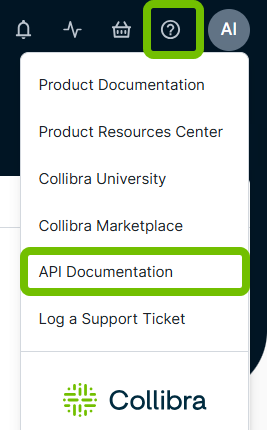
In your Collibra Platform environment, click  in the upper-right corner.
{% endstep %}
{% step %}
Select **API documentation**.
in the upper-right corner.
{% endstep %}
{% step %}
Select **API documentation**.
 {% endstep %}
{% step %}
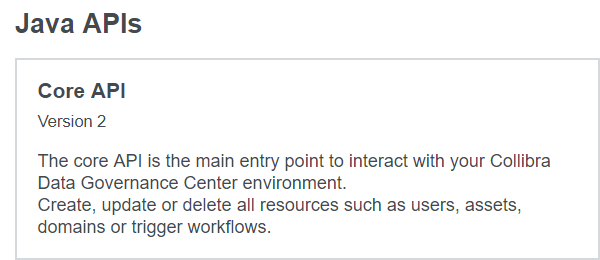
On the API documentation page, select the Java **Core API**.
{% endstep %}
{% step %}
On the API documentation page, select the Java **Core API**.
 {% endstep %}
{% endstepper %}
## Working with the Collibra Java API builders
All the supported asset related operations are listed under the **AssetApi** interface in the Collibra Java API documentation.
In the context of workflow script tasks, the **\Api** interfaces (such as AssetApi, CommunityTypeApi, FileApi, and so on) are already instantiated and accessible via **\Api** variables (such as assetApi, communityTypeApi, fileApi, and so on).
The API makes use of universally unique identifiers (UUIDs) to find resources in Collibra Platform. There are several ways of retrieving the UUID of a resource as mentioned in the [Finding resource IDs](https://productresources.collibra.com/docs/collibra/latest/Default.htm#cshid=DOC0041) section of the Collibra Documentation. The easiest way to retrieve the UUID is from the URL of a resource:
{% tabs %}
{% tab title="Example" icon="glasses-round" %}
https\://\/\/00000000-0000-0000-0001-000100000001
{% endtab %}
{% endtabs %}
In Collibra Java API v2, the UUID is provided as a string via the `string2Uuid()` helper method.
Before referring to any class, you must first have a reference to their packages. You resolve class references via the `import` statement.
{% hint style="warning" %}
Because each script task is independent, include `import` statements for all the packages you are using in a script for each script task. Avoid using generic imports to reduce execution time.
{% endhint %}
## Create a new asset
To create a new asset, use the `addAsset()` method which requires an `AddAssetRequest` parameter. The **AddAssetRequest** class has a `builder()` method available.
* Class: AssetApi
* Main method: AddAsset()
* Parameter and builder method: AddAssetRequest.builder()
| Builder parameters | Mandatory | Type | Description |
| ------------------ | --------- | ------ | ---------------------------------------------------------------------------------------- |
| name() | Yes | String | Sets the name of the asset. |
| typeId() | Yes | UUID | Sets the asset type. Use the string2Uuid() helper method. |
| domainId() | Yes | UUID | Places the asset inside the domain. Use the string2Uuid() helper method. |
| build() | Yes | | Builds the object. |
| displayName() | No | String | Sets the display name of the asset. By default the display name is the same as the name. |
| id() | No | UUID | Sets the id of the asset. Use the string2Uuid() helper method. |
| status() | No | UUID | Sets the status of the asset. Use the string2Uuid() helper method. |
{% tabs %}
{% tab title="Example" icon="glasses-round" %}
```groovy
// #importFile NONE
import com.collibra.dgc.core.api.dto.instance.asset.AddAssetRequest
assetApi.addAsset(AddAssetRequest.builder()
.name("DGC")
.typeId(string2Uuid("00000000-0000-0000-0000-000000011003"))
.domainId(string2Uuid("00000000-0000-0000-0000-000000006013"))
.build()
)
```
{% endtab %}
{% endtabs %}
{% hint style="info" %}
The command works for the out-of-the-box **New Business Terms** domain and **Acronym** asset type.
{% endhint %}
## Set asset attributes
To set asset attributes, use the `setAssetAttributes()` method which requires a `SetAssetAttributesRequest` parameter. The **SetAssetAttributesRequest** class has a `builder()` method available.
* Class: AssetApi
* Main method: setAssetAttributes()
* Parameter and builder method: SetAssetAttributesRequest.builder()
| Builder parameters | Mandatory | Type | Description |
| ------------------ | --------- | ---- | ------------------------------------------------------------- |
| assetId() | Yes | UUID | Identifies the asset. Use the string2Uuid() helper method. |
| typeId() | Yes | UUID | Sets the attribute type. Use the string2Uuid() helper method. |
| values() | Yes | list | Sets the value or values of the attribute. |
| build() | Yes | | Builds the object. |
{% tabs %}
{% tab title="Example" icon="glasses-round" %}
```groovy
// #importFile NONE
import com.collibra.dgc.core.api.dto.instance.asset.SetAssetAttributesRequest
assetApi.setAssetAttributes(SetAssetAttributesRequest.builder()
.assetId(
string2Uuid("1b2f8eb4-4f13-4cd2-a238-9a7d9666a93a")
)
.typeId(
string2Uuid("00000000-0000-0000-0000-000000000202")
)
.values(["Data Governance Center"])
.build()
)
```
{% endtab %}
{% endtabs %}
{% hint style="info" %}
The command sets the definition of the asset to *Data Governance Center*. The command does not work unless you replace the asset ID with a valid one.
{% endhint %}
### Other attribute actions
Setting attribute values means that existing values are replaced with the ones specified. To add attributes of the same type or modify existing attributes, use the **AttributeApi** interface.
You can add one attribute using the `addAttribute()` method. The following example adds an attribute of the type specified by the *attributeType* variable, with the value of the *attributeValue* variable to the asset where the workflow was started. Both variables hold String values.
```groovy
// #importFile NONE
import com.collibra.dgc.core.api.dto.instance.attribute.AddAttributeRequest
attributeApi.addAttribute(AddAttributeRequest.builder()
.assetId(item.getId())
.typeId(string2Uuid(attributeType))
.value(attributeValue)
.build()
)
```
You can add multiple attributes at once by using the `addAttributes()` method with a list of `addAttributeRequest` objects, for example:
```groovy
// #importFile NONE
import com.collibra.dgc.core.api.dto.instance.attribute.AddAttributeRequest
List attributesList = []
attributesList.add(AddAttributeRequest.builder()
.assetId(item.getId())
.typeId(string2Uuid(attributeType1))
.value(attributeValue1)
.build()
)
attributesList.add(AddAttributeRequest.builder()
.assetId(item.getId())
.typeId(string2Uuid(attributeType2))
.value(attributeValue2)
.build()
)
attributeApi.addAttributes(attributesList)
```
To modify existing attributes, you must first determine their ID and then use the `changeAttribute()` method to update them. The following example updates the most recently added attribute of the type specified by the *attributeType* variable with the value of the *attributeValue* variable for the asset where the workflow was started.
```groovy
// #importFile NONE
import com.collibra.dgc.core.api.dto.instance.attribute.FindAttributesRequest
import com.collibra.dgc.core.api.dto.instance.attribute.ChangeAttributeRequest
UUID attributeId = attributeApi.findAttributes(FindAttributesRequest.builder()
.assetId(item.getId())
.typeIds([attributeType])
.build()
).getResults().get(0).getId()
attributeApi.changeAttribute(ChangeAttributeRequest.builder()
.id(attributeId)
.value(attributeValue)
.build()
)
```
## Modify an asset
To modify an asset, use the `changeAsset()` method which requires a `changeAssetRequest` parameter. The **changeAssetRequest** class has a `builder()` method available.
* Class: AssetApi
* Main method: changeAsset()
* Parameter and builder method: ChangeAssetRequest.builder()
| Builder parameters | Mandatory | Type | Description |
| ------------------ | ------------------- | ------ | --------------------------------------------------------------------- |
| id() | Yes | UUID | Identifies the asset. Use the string2Uuid() helper method. |
| displayName() | Select at least one | String | Changes the display name of the asset. |
| domainId() | Select at least one | UUID | Moves the asset to the domain. Use the string2Uuid() helper method. |
| name() | Select at least one | String | Changes the name of the asset. |
| statusId() | Select at least one | UUID | Changes the status of the asset. Use the string2Uuid() helper method. |
| typeId() | Select at least one | UUID | Changes the asset type. Use the string2Uuid() helper method. |
| build() | Yes | | Builds the object. |
{% tabs %}
{% tab title="Example" icon="glasses-round" %}
```groovy
// #importFile NONE
import com.collibra.dgc.core.api.dto.instance.asset.ChangeAssetRequest
assetApi.changeAsset(ChangeAssetRequest.builder()
.id(
string2Uuid("1b2f8eb4-4f13-4cd2-a238-9a7d9666a93a")
)
.statusId(
string2Uuid("00000000-0000-0000-0000-000000005009")
)
.build()
)
```
{% endtab %}
{% endtabs %}
{% hint style="info" %}
The command changes the status of the asset to **Approved**. The command does not work unless you replace the asset UUID with a valid one.
{% endhint %}
## Multiple operations
This example creates a new acronym *GDPR* in the out-of-the-box **New Business Terms** domain, adds a description and changes the status to **Approved**.
{% tabs %}
{% tab title="Example" icon="glasses-round" %}
```groovy
// #importFile NONE
import com.collibra.dgc.core.api.dto.instance.asset.AddAssetRequest
import com.collibra.dgc.core.api.dto.instance.asset.ChangeAssetRequest
import com.collibra.dgc.core.api.dto.instance.asset.SetAssetAttributesRequest
import com.collibra.dgc.core.api.model.instance.Asset
Asset GDPR = assetApi.addAsset(AddAssetRequest.builder()
.name("GDPR")
.typeId(
string2Uuid("00000000-0000-0000-0000-000000011003")
)
.domainId(
string2Uuid("00000000-0000-0000-0000-000000006013")
)
.build()
)
assetApi.setAssetAttributes(SetAssetAttributesRequest.builder()
.assetId(GDPR.getId())
.values(["General Data Protection Regulation"])
.typeId(
string2Uuid("00000000-0000-0000-0000-000000000202")
)
.build()
)
assetApi.changeAsset(ChangeAssetRequest.builder()
.id(GDPR.getId())
.statusId(
string2Uuid("00000000-0000-0000-0000-000000005009")
)
.build()
)
```
{% endtab %}
{% endtabs %}
## Additional resources
* Read the [Getting started with workflows](/workflows/workflows-at-collibra.md) Workflow Designer documentation section.
* Read the [Using workflows](https://productresources.collibra.com/docs/collibra/latest/Default.htm#cshid=DOC1113) Collibra Documentation section.
* Consult the Java API documentation: https\://\/javadocs/javav2/index.html.
---
# Agent Instructions
This documentation is published with GitBook. GitBook is the documentation platform designed so that both humans and AI agents can read, navigate, and reason over technical content effectively. Learn more at gitbook.com.
## Querying This Documentation
If you need additional information that is not directly available in this page, you can query the documentation dynamically by asking a question.
Perform an HTTP GET request on the current page URL with the `ask` query parameter, and the optional `goal` query parameter:
```
GET https://developer.collibra.com/tutorials/introduction-to-builders.md?ask=&goal=
```
`ask` is the immediate question: it should be specific, self-contained, and written in natural language.
`goal` is optional and describes the broader end goal you are ultimately trying to accomplish on behalf of the user. GitBook uses it to tailor the answer towards what is most useful for that goal.
The response will contain a direct answer to the question and relevant excerpts and sources from the documentation.
Use this mechanism when the answer is not explicitly present in the current page, you need clarification or additional context, or you want to retrieve related documentation sections.
{% endstep %}
{% endstepper %}
## Working with the Collibra Java API builders
All the supported asset related operations are listed under the **AssetApi** interface in the Collibra Java API documentation.
In the context of workflow script tasks, the **\Api** interfaces (such as AssetApi, CommunityTypeApi, FileApi, and so on) are already instantiated and accessible via **\Api** variables (such as assetApi, communityTypeApi, fileApi, and so on).
The API makes use of universally unique identifiers (UUIDs) to find resources in Collibra Platform. There are several ways of retrieving the UUID of a resource as mentioned in the [Finding resource IDs](https://productresources.collibra.com/docs/collibra/latest/Default.htm#cshid=DOC0041) section of the Collibra Documentation. The easiest way to retrieve the UUID is from the URL of a resource:
{% tabs %}
{% tab title="Example" icon="glasses-round" %}
https\://\/\/00000000-0000-0000-0001-000100000001
{% endtab %}
{% endtabs %}
In Collibra Java API v2, the UUID is provided as a string via the `string2Uuid()` helper method.
Before referring to any class, you must first have a reference to their packages. You resolve class references via the `import` statement.
{% hint style="warning" %}
Because each script task is independent, include `import` statements for all the packages you are using in a script for each script task. Avoid using generic imports to reduce execution time.
{% endhint %}
## Create a new asset
To create a new asset, use the `addAsset()` method which requires an `AddAssetRequest` parameter. The **AddAssetRequest** class has a `builder()` method available.
* Class: AssetApi
* Main method: AddAsset()
* Parameter and builder method: AddAssetRequest.builder()
| Builder parameters | Mandatory | Type | Description |
| ------------------ | --------- | ------ | ---------------------------------------------------------------------------------------- |
| name() | Yes | String | Sets the name of the asset. |
| typeId() | Yes | UUID | Sets the asset type. Use the string2Uuid() helper method. |
| domainId() | Yes | UUID | Places the asset inside the domain. Use the string2Uuid() helper method. |
| build() | Yes | | Builds the object. |
| displayName() | No | String | Sets the display name of the asset. By default the display name is the same as the name. |
| id() | No | UUID | Sets the id of the asset. Use the string2Uuid() helper method. |
| status() | No | UUID | Sets the status of the asset. Use the string2Uuid() helper method. |
{% tabs %}
{% tab title="Example" icon="glasses-round" %}
```groovy
// #importFile NONE
import com.collibra.dgc.core.api.dto.instance.asset.AddAssetRequest
assetApi.addAsset(AddAssetRequest.builder()
.name("DGC")
.typeId(string2Uuid("00000000-0000-0000-0000-000000011003"))
.domainId(string2Uuid("00000000-0000-0000-0000-000000006013"))
.build()
)
```
{% endtab %}
{% endtabs %}
{% hint style="info" %}
The command works for the out-of-the-box **New Business Terms** domain and **Acronym** asset type.
{% endhint %}
## Set asset attributes
To set asset attributes, use the `setAssetAttributes()` method which requires a `SetAssetAttributesRequest` parameter. The **SetAssetAttributesRequest** class has a `builder()` method available.
* Class: AssetApi
* Main method: setAssetAttributes()
* Parameter and builder method: SetAssetAttributesRequest.builder()
| Builder parameters | Mandatory | Type | Description |
| ------------------ | --------- | ---- | ------------------------------------------------------------- |
| assetId() | Yes | UUID | Identifies the asset. Use the string2Uuid() helper method. |
| typeId() | Yes | UUID | Sets the attribute type. Use the string2Uuid() helper method. |
| values() | Yes | list | Sets the value or values of the attribute. |
| build() | Yes | | Builds the object. |
{% tabs %}
{% tab title="Example" icon="glasses-round" %}
```groovy
// #importFile NONE
import com.collibra.dgc.core.api.dto.instance.asset.SetAssetAttributesRequest
assetApi.setAssetAttributes(SetAssetAttributesRequest.builder()
.assetId(
string2Uuid("1b2f8eb4-4f13-4cd2-a238-9a7d9666a93a")
)
.typeId(
string2Uuid("00000000-0000-0000-0000-000000000202")
)
.values(["Data Governance Center"])
.build()
)
```
{% endtab %}
{% endtabs %}
{% hint style="info" %}
The command sets the definition of the asset to *Data Governance Center*. The command does not work unless you replace the asset ID with a valid one.
{% endhint %}
### Other attribute actions
Setting attribute values means that existing values are replaced with the ones specified. To add attributes of the same type or modify existing attributes, use the **AttributeApi** interface.
You can add one attribute using the `addAttribute()` method. The following example adds an attribute of the type specified by the *attributeType* variable, with the value of the *attributeValue* variable to the asset where the workflow was started. Both variables hold String values.
```groovy
// #importFile NONE
import com.collibra.dgc.core.api.dto.instance.attribute.AddAttributeRequest
attributeApi.addAttribute(AddAttributeRequest.builder()
.assetId(item.getId())
.typeId(string2Uuid(attributeType))
.value(attributeValue)
.build()
)
```
You can add multiple attributes at once by using the `addAttributes()` method with a list of `addAttributeRequest` objects, for example:
```groovy
// #importFile NONE
import com.collibra.dgc.core.api.dto.instance.attribute.AddAttributeRequest
List attributesList = []
attributesList.add(AddAttributeRequest.builder()
.assetId(item.getId())
.typeId(string2Uuid(attributeType1))
.value(attributeValue1)
.build()
)
attributesList.add(AddAttributeRequest.builder()
.assetId(item.getId())
.typeId(string2Uuid(attributeType2))
.value(attributeValue2)
.build()
)
attributeApi.addAttributes(attributesList)
```
To modify existing attributes, you must first determine their ID and then use the `changeAttribute()` method to update them. The following example updates the most recently added attribute of the type specified by the *attributeType* variable with the value of the *attributeValue* variable for the asset where the workflow was started.
```groovy
// #importFile NONE
import com.collibra.dgc.core.api.dto.instance.attribute.FindAttributesRequest
import com.collibra.dgc.core.api.dto.instance.attribute.ChangeAttributeRequest
UUID attributeId = attributeApi.findAttributes(FindAttributesRequest.builder()
.assetId(item.getId())
.typeIds([attributeType])
.build()
).getResults().get(0).getId()
attributeApi.changeAttribute(ChangeAttributeRequest.builder()
.id(attributeId)
.value(attributeValue)
.build()
)
```
## Modify an asset
To modify an asset, use the `changeAsset()` method which requires a `changeAssetRequest` parameter. The **changeAssetRequest** class has a `builder()` method available.
* Class: AssetApi
* Main method: changeAsset()
* Parameter and builder method: ChangeAssetRequest.builder()
| Builder parameters | Mandatory | Type | Description |
| ------------------ | ------------------- | ------ | --------------------------------------------------------------------- |
| id() | Yes | UUID | Identifies the asset. Use the string2Uuid() helper method. |
| displayName() | Select at least one | String | Changes the display name of the asset. |
| domainId() | Select at least one | UUID | Moves the asset to the domain. Use the string2Uuid() helper method. |
| name() | Select at least one | String | Changes the name of the asset. |
| statusId() | Select at least one | UUID | Changes the status of the asset. Use the string2Uuid() helper method. |
| typeId() | Select at least one | UUID | Changes the asset type. Use the string2Uuid() helper method. |
| build() | Yes | | Builds the object. |
{% tabs %}
{% tab title="Example" icon="glasses-round" %}
```groovy
// #importFile NONE
import com.collibra.dgc.core.api.dto.instance.asset.ChangeAssetRequest
assetApi.changeAsset(ChangeAssetRequest.builder()
.id(
string2Uuid("1b2f8eb4-4f13-4cd2-a238-9a7d9666a93a")
)
.statusId(
string2Uuid("00000000-0000-0000-0000-000000005009")
)
.build()
)
```
{% endtab %}
{% endtabs %}
{% hint style="info" %}
The command changes the status of the asset to **Approved**. The command does not work unless you replace the asset UUID with a valid one.
{% endhint %}
## Multiple operations
This example creates a new acronym *GDPR* in the out-of-the-box **New Business Terms** domain, adds a description and changes the status to **Approved**.
{% tabs %}
{% tab title="Example" icon="glasses-round" %}
```groovy
// #importFile NONE
import com.collibra.dgc.core.api.dto.instance.asset.AddAssetRequest
import com.collibra.dgc.core.api.dto.instance.asset.ChangeAssetRequest
import com.collibra.dgc.core.api.dto.instance.asset.SetAssetAttributesRequest
import com.collibra.dgc.core.api.model.instance.Asset
Asset GDPR = assetApi.addAsset(AddAssetRequest.builder()
.name("GDPR")
.typeId(
string2Uuid("00000000-0000-0000-0000-000000011003")
)
.domainId(
string2Uuid("00000000-0000-0000-0000-000000006013")
)
.build()
)
assetApi.setAssetAttributes(SetAssetAttributesRequest.builder()
.assetId(GDPR.getId())
.values(["General Data Protection Regulation"])
.typeId(
string2Uuid("00000000-0000-0000-0000-000000000202")
)
.build()
)
assetApi.changeAsset(ChangeAssetRequest.builder()
.id(GDPR.getId())
.statusId(
string2Uuid("00000000-0000-0000-0000-000000005009")
)
.build()
)
```
{% endtab %}
{% endtabs %}
## Additional resources
* Read the [Getting started with workflows](/workflows/workflows-at-collibra.md) Workflow Designer documentation section.
* Read the [Using workflows](https://productresources.collibra.com/docs/collibra/latest/Default.htm#cshid=DOC1113) Collibra Documentation section.
* Consult the Java API documentation: https\://\/javadocs/javav2/index.html.
---
# Agent Instructions
This documentation is published with GitBook. GitBook is the documentation platform designed so that both humans and AI agents can read, navigate, and reason over technical content effectively. Learn more at gitbook.com.
## Querying This Documentation
If you need additional information that is not directly available in this page, you can query the documentation dynamically by asking a question.
Perform an HTTP GET request on the current page URL with the `ask` query parameter, and the optional `goal` query parameter:
```
GET https://developer.collibra.com/tutorials/introduction-to-builders.md?ask=&goal=
```
`ask` is the immediate question: it should be specific, self-contained, and written in natural language.
`goal` is optional and describes the broader end goal you are ultimately trying to accomplish on behalf of the user. GitBook uses it to tailor the answer towards what is most useful for that goal.
The response will contain a direct answer to the question and relevant excerpts and sources from the documentation.
Use this mechanism when the answer is not explicitly present in the current page, you need clarification or additional context, or you want to retrieve related documentation sections.