> For the complete documentation index, see [llms.txt](https://developer.collibra.com/llms.txt). Markdown versions of documentation pages are available by appending `.md` to page URLs; this page is available as [Markdown](https://developer.collibra.com/tutorials/getting-started-with-the-import-api.md).
# Getting started with the Import API
In this tutorial, you learn about the basic building blocks of the Collibra REST Import API: the JSON file format, the identifiers and the import commands. You import a new asset that belongs to a new domain in a new community.
## Prerequisites
* Access to Collibra Platform.
* Postman or an alternative HTTP API client.
{% hint style="info" %}
Some references might be specific to the Postman application.
For more information on how to install Postman and authenticate, see the [Collibra REST API authentication](/tutorials/collibra-rest-api-authentication.md) tutorial.
{% endhint %}
## About the Collibra REST Import API
The import functionality allows you to create or edit data in bulk in Collibra. By importing, you can create and edit communities, domains, assets, mappings, or complex relations and their characteristics such as attributes, relations, responsibilities, and tags.
All import operations are based on a common set of rules and a common format.
* You must provide all the information about the imported resources in a JSON format.
* You must uniquely identify all the resources you work with.
### The JSON file format
The import API accepts an array of objects where each object represents a command to be executed. Each import command must contain the following fields:
* `resourceType`: The type of resource the import command is for, for example `Community`, `Domain`, `Asset`, `Mapping`, `Complex Relation`.
* `identifier`: The universally unique identifier (UUID) of the resource or a combination of other characteristics that uniquely identify the resource, for example `id`, `name`, `externalSystemId` and `externalEntityId`.
```json
[
{
"resourceType": "Community",
"identifier": {
"name": "Data Governance Council"
}
}
]
```
### The `identifier` field
Identifiers ensure the imported resource is uniquely identified. All resources can be identified by their Collibra UUID. Additionally, most resources can be identified by name or by a combination of the IDs of the external system containing the resource and the external resource.
When you identify a resource by name, you must also identify the domain or community containing that resource. For example, you can identify an asset by name but you must also include the identifier of the domain containing the asset. You can also identify the domain by name but you must include the identifier of the community containing the domain.
```json
[
{
"resourceType": "Asset",
"identifier": {
"name": "Accuracy",
"domain": {
"name": "Data Quality Dimensions",
"community": {
"name": "Data Governance Council"
}
}
}
}
]
```
### The import commands
The fields that follow the identifier represent the desired outcome for the imported resource. These might be the location of the resource or some of the resource characteristics.
The handling of existing characteristics differs from that of existing resources: existing resources are updated while existing characteristics are replaced. For example, if the import command contains a description for an existing asset, the description in Collibra Platform is replaced with the one from the import command.
Example: update an existing asset
The following example adds or replaces the description of the out-of-the-box **Accuracy** asset:
```json
[
{
"resourceType": "Asset",
"identifier": {
"name": "Accuracy",
"domain": {
"name": "Data Quality Dimensions",
"community": {
"name": "Data Governance Council"
}
}
},
"attributes": {
"Description": [{
"value": "A property of data that has the right value and is represented in an unambiguous form."
}]
}
}
]
```
For a list of available fields, see the [API import commands](/api/guides/import-api/import-commands.md) section of the Import API documentation.
## Import example
In this example, you add a new community, a new domain and a new asset with a description and additional profiling information.
{% hint style="info" %}
If a command depends on the result of a previous command, the previous command has to appear in the input data before the command that depends on it. When you use a single file to import a community and a domain that belongs to it, the command to import the community should appear first.
{% endhint %}
Download the full [JSON example](https://cdn.collibra.com/developer/multiple-attributes.json) or build your own file by combining the following commands:
### Community import command
```json
{
"resourceType": "Community",
"identifier": {
"name": "DBs Community"
}
}
```
To create a new community, the import command must have the following field:
* `name`
### Domain import command
```json
{
"resourceType": "Domain",
"identifier": {
"name": "Physical Domain",
"community": {
"name": "DBs Community"
}
},
"type": {
"name": "Physical Data Dictionary"
}
}
```
To create a new domain, the import command must have the following fields:
* `name`
* `type`
* `community`
### Asset import command
```json
{
"resourceType": "Asset",
"identifier": {
"name": "DB_TABLE",
"domain": {
"name": "Physical Domain",
"community": {
"name": "DBs Community"
}
}
},
"type": {
"name": "Table"
},
"attributes": {
"Description": [
{
"value": "The Users table."
}
],
"Profiling Information": [
{
"value": "Profiling information not available."
}
]
}
}
```
To create a new asset, the import command must have the following fields:
* `name`
* `type`
* `domain`
In this example, you also add two attributes to the imported asset.
### Complete import file
Combine the three commands above into a single JSON array and save it as a `.json` file:
```json
[
{
"resourceType": "Community",
"identifier": {
"name": "DBs Community"
}
},
{
"resourceType": "Domain",
"identifier": {
"name": "Physical Domain",
"community": {
"name": "DBs Community"
}
},
"type": {
"name": "Physical Data Dictionary"
}
},
{
"resourceType": "Asset",
"identifier": {
"name": "DB_TABLE",
"domain": {
"name": "Physical Domain",
"community": {
"name": "DBs Community"
}
}
},
"type": {
"name": "Table"
},
"attributes": {
"Description": [
{
"value": "The Users table."
}
],
"Profiling Information": [
{
"value": "Profiling information not available."
}
]
}
}
]
```
## Import API REST call
To start an import job, use the `POST` method and the `/import/json-job` endpoint of the **Import** resource.
The only required parameter is `file`.
```bash
curl -X POST 'https:///rest/2.0/import/json-job' \
-H 'Authorization: Bearer ' \
-H 'Content-Type: multipart/form-data' \
-F 'file=@'
```
For a list of optional parameters, see the [Import REST API endpoints and parameters](/api/guides/import-api.md#import-rest-api-endpoints-and-parameters) section of the Import API documentation.
The response contains information about the job.
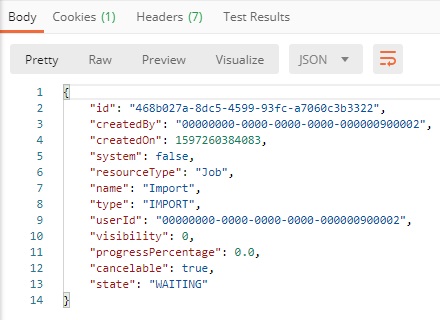 You can see the results of the import job on the [Activities page](https://productresources.collibra.com/docs/collibra/latest/Default.htm#cshid=DOC0007) or in the [Collibra logs](https://productresources.collibra.com/docs/collibra/latest/Default.htm#cshid=DOC0429).
{% hint style="info" %}
To monitor the status of an import job, use the **Jobs** resource of the REST Core API: `GET /jobs/{jobId}`. The id of the job is returned in the import request response body as the `id` field.
{% endhint %}
## Summary
You have learned about the building blocks of the Collibra REST Import API and used it to create a community, a domain, and an asset with attributes.
## Additional resources
* Read the [Collibra Import API documentation](/api/guides/import-api.md).
* Consult the Collibra REST Import API documentation provided with your version of Collibra Platform at `https:///api-docs/index.html?urls.primaryName=import-api`.
You can see the results of the import job on the [Activities page](https://productresources.collibra.com/docs/collibra/latest/Default.htm#cshid=DOC0007) or in the [Collibra logs](https://productresources.collibra.com/docs/collibra/latest/Default.htm#cshid=DOC0429).
{% hint style="info" %}
To monitor the status of an import job, use the **Jobs** resource of the REST Core API: `GET /jobs/{jobId}`. The id of the job is returned in the import request response body as the `id` field.
{% endhint %}
## Summary
You have learned about the building blocks of the Collibra REST Import API and used it to create a community, a domain, and an asset with attributes.
## Additional resources
* Read the [Collibra Import API documentation](/api/guides/import-api.md).
* Consult the Collibra REST Import API documentation provided with your version of Collibra Platform at `https:///api-docs/index.html?urls.primaryName=import-api`.