> For the complete documentation index, see [llms.txt](https://developer.collibra.com/llms.txt). Markdown versions of documentation pages are available by appending `.md` to page URLs; this page is available as [Markdown](https://developer.collibra.com/workflows/out-of-the-box-workflows-walk-throughs/request-assets-access.md).
# Request Assets Access
The Request Assets Access workflow allows you to request access to assets that are referenced in your shopping cart. All data owners have to approve the request before you can access the assets.
{% hint style="info" %}
This workflow accepts by default only data sets that contain column attributes.
{% endhint %}

## Roles
| Role | Task | Required |
| ----------------- | --------------------------------------------------------------------------------------------------------------------------------------------------------------------- | -------- |
| Requester | | Yes |
| Owner | - Approve the request for each data set or report element.
- Provide access to the data set elements in case no technical stewards are defined.
| Yes |
| Technical Steward | - Provide access to the data set elements.
| Yes |
## Workflow status transformations
| Status | Description |
| ---------------- | ------------------------------------------------------------------ |
| Invalid | The initial status of a Data Usage asset. |
| Approval Pending | The approvers are voting for the approval of a data usage request. |
| Accepted | The technical stewards are granting the requested access. |
| Access Granted | The requester is granted access to the requested resources. |
| Rejected | The approvers rejected the data usage request. |
## Roles and permissions
To request access, you must have a global role with the **Workflows** > **Start workflow** global permission, which requires a Viewer license.
If Data Privacy or data products are enabled, or if the workflow has been configured to require custom inputs from the requester, you must also have a global role with the **Workflows** > **Participate in workflow** global permission. This permission requires a Contributor license.
All other users involved in the workflow, such as Owners and Technical Stewards, must have a global role with the **Workflows** > **Participate in workflow** global permission.
## Start the workflow
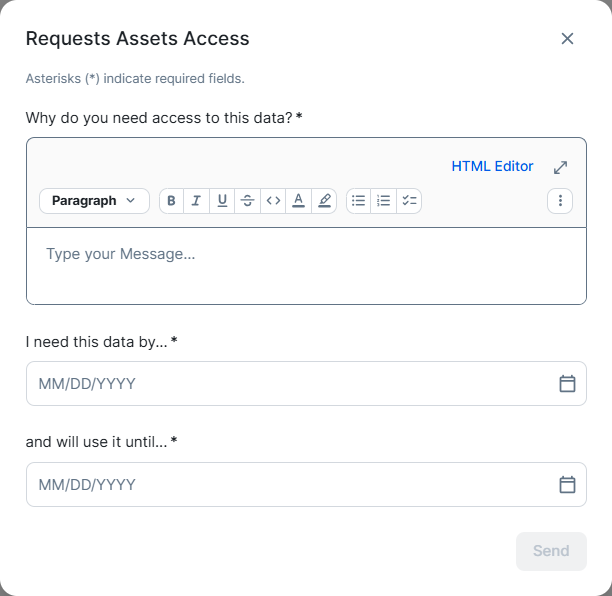
You start the workflow when you request access to data by checking out the data basket.
 ## Asset management
Each access request is created as a **Data Usage** asset type. The workflow calculates the name of the asset by combining the creation date with a sequential number for that day: `2019-09-30 #1` and sets the asset characteristics according to the data submitted through the start form. The user who started the workflow receives the **Requester** role.
## Preparation
The workflow checks the integrity of the checked out resources:
* The data sets exist and that they contain at least one data element.
* Each data element and each report have an owner.
{% hint style="info" %}
This workflow accepts by default only data sets that contain column attributes.
{% endhint %}
The workflow ends if the resources are not valid.
Based on the owners of the resources, the workflow assembles a list of approvers.
## Voting
The approvers are asked to approve or reject the access request. During this stage, the data usage asset is in **Approval Pending** status.
Voting is handled by the [Voting Sub-Process](/workflows/out-of-the-box-workflows-walk-throughs/voting-sub-process.md) workflow and you can tweak it by changing the values of the voting related [Configuration variables](/workflows/out-of-the-box-workflows-walk-throughs/request-assets-access/request-assets-access-configuration.md#configvariables). Additionally, the [call activity](/workflows/out-of-the-box-workflows-walk-throughs/voting-sub-process/voting-sub-process-instructions.md#call-the-voting-sub-proce) also sets the **earlyComplete** variable to `true`.
If the voting result is negative, the data usage asset marked as **Rejected**, the requester receives an email notification and the workflow ends.
When the voting result is positive, the data usage asset is marked as **Accepted** and the workflow moves to the next stage.
## Granting access
For each data set element, the workflow identifies the technical stewards and prompts them to grant the requesting user access to that resource outside Collibra. If some data set elements do not have technical stewards assigned, the same task is presented to the owners. Owners that do not have the external system permissions to grant access to the requester can reassign the task. Once they have granted access, the assignees must complete the task by clicking the **Done** button.
The data usage asset is marked as **Access Granted**.
The requester is assigned a **Data Analyst Level 2** role for each data set, data set element and report, in Collibra and is notified via email of the successful completion of the request.
---
# Agent Instructions
This documentation is published with GitBook. GitBook is the documentation platform designed so that both humans and AI agents can read, navigate, and reason over technical content effectively. Learn more at gitbook.com.
## Querying This Documentation
If you need additional information that is not directly available in this page, you can query the documentation by asking a question.
Perform an HTTP GET request on the following URL with the `ask` and `goal` query parameters:
```
GET https://developer.collibra.com/workflows/out-of-the-box-workflows-walk-throughs/request-assets-access.md?ask=&goal=
```
`ask` is the immediate question: it should be specific, self-contained, and written in natural language.
`goal` is what the user is ultimately trying to achieve, the reason they need the answer. Sharing it helps GitBook give you a better, more relevant answer. A goal is most helpful when it describes the outcome the user wants rather than restating the question. For example, with `ask=how do I create an API token`, a goal like `automate deployments from our CI pipeline` lets GitBook tailor the answer to that use case.
The response will contain a direct answer to the question and relevant excerpts and sources from the documentation.
Use this mechanism when the answer is not explicitly present in the current page, you need clarification or additional context, or you want to retrieve related documentation sections.
## Asset management
Each access request is created as a **Data Usage** asset type. The workflow calculates the name of the asset by combining the creation date with a sequential number for that day: `2019-09-30 #1` and sets the asset characteristics according to the data submitted through the start form. The user who started the workflow receives the **Requester** role.
## Preparation
The workflow checks the integrity of the checked out resources:
* The data sets exist and that they contain at least one data element.
* Each data element and each report have an owner.
{% hint style="info" %}
This workflow accepts by default only data sets that contain column attributes.
{% endhint %}
The workflow ends if the resources are not valid.
Based on the owners of the resources, the workflow assembles a list of approvers.
## Voting
The approvers are asked to approve or reject the access request. During this stage, the data usage asset is in **Approval Pending** status.
Voting is handled by the [Voting Sub-Process](/workflows/out-of-the-box-workflows-walk-throughs/voting-sub-process.md) workflow and you can tweak it by changing the values of the voting related [Configuration variables](/workflows/out-of-the-box-workflows-walk-throughs/request-assets-access/request-assets-access-configuration.md#configvariables). Additionally, the [call activity](/workflows/out-of-the-box-workflows-walk-throughs/voting-sub-process/voting-sub-process-instructions.md#call-the-voting-sub-proce) also sets the **earlyComplete** variable to `true`.
If the voting result is negative, the data usage asset marked as **Rejected**, the requester receives an email notification and the workflow ends.
When the voting result is positive, the data usage asset is marked as **Accepted** and the workflow moves to the next stage.
## Granting access
For each data set element, the workflow identifies the technical stewards and prompts them to grant the requesting user access to that resource outside Collibra. If some data set elements do not have technical stewards assigned, the same task is presented to the owners. Owners that do not have the external system permissions to grant access to the requester can reassign the task. Once they have granted access, the assignees must complete the task by clicking the **Done** button.
The data usage asset is marked as **Access Granted**.
The requester is assigned a **Data Analyst Level 2** role for each data set, data set element and report, in Collibra and is notified via email of the successful completion of the request.
---
# Agent Instructions
This documentation is published with GitBook. GitBook is the documentation platform designed so that both humans and AI agents can read, navigate, and reason over technical content effectively. Learn more at gitbook.com.
## Querying This Documentation
If you need additional information that is not directly available in this page, you can query the documentation by asking a question.
Perform an HTTP GET request on the following URL with the `ask` and `goal` query parameters:
```
GET https://developer.collibra.com/workflows/out-of-the-box-workflows-walk-throughs/request-assets-access.md?ask=&goal=
```
`ask` is the immediate question: it should be specific, self-contained, and written in natural language.
`goal` is what the user is ultimately trying to achieve, the reason they need the answer. Sharing it helps GitBook give you a better, more relevant answer. A goal is most helpful when it describes the outcome the user wants rather than restating the question. For example, with `ask=how do I create an API token`, a goal like `automate deployments from our CI pipeline` lets GitBook tailor the answer to that use case.
The response will contain a direct answer to the question and relevant excerpts and sources from the documentation.
Use this mechanism when the answer is not explicitly present in the current page, you need clarification or additional context, or you want to retrieve related documentation sections.