> For the complete documentation index, see [llms.txt](https://developer.collibra.com/llms.txt). Markdown versions of documentation pages are available by appending `.md` to page URLs; this page is available as [Markdown](https://developer.collibra.com/workflows/designing-workflows/forms/start-forms/form-values.md).

# Form values

Form values determine how a [drop-down form property](/workflows/designing-workflows/forms/start-forms/form-property-types.md#drop-dow) is used. You can also use form values to include help text to help the user understand what is being asked for with a specific form property. While the Workflow Designer supports form properties for backwards compatibility, use [form references](/workflows/designing-workflows/forms.md) when designing user tasks. Form references offer enhanced configuration options.

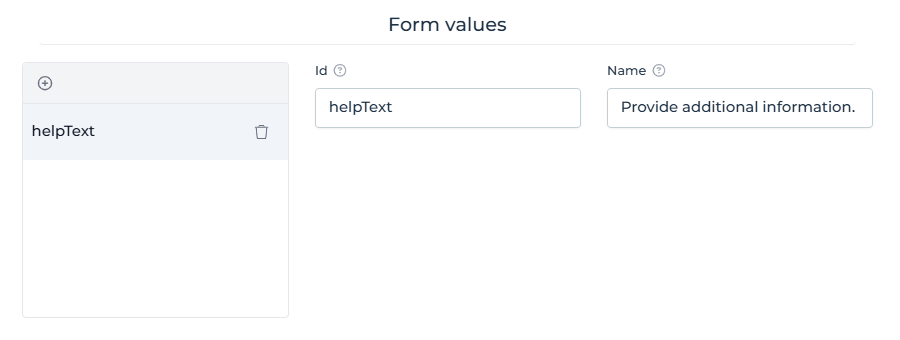
You enter these attributes in the **Form values** section of a **Custom** form property type.

<img src="/files/tb6z5BkrePmoUcUo93TI" alt="Form value properties in Collibra Workflow Designer" width="50%">

## Drop-down form

defaultFromResource

Determines the default value.

Possible values:

* **true**: The default value is the ID of the currently displayed resource.
* **false**: The default value is not the ID of the currently displayed resource.

multiValue

Determines if the user can enter multiple values.

Possible values:

* **true**: The user can enter multiple values.

  <div data-gb-custom-block data-tag="hint" data-style="info" class="hint hint-info"><p>When you design a form with multiple selection components that are intended to be visible one at a time and configured to write to the same variable, ensure that the hidden component is also ignored to avoid conflicts that lead to errors. To achieve this, use a negated version of the <strong>Visible</strong> condition for the <strong>Ignored</strong> rendering property. You can negate an expression by prepending <code>!</code> to it. For example, if the <strong>Visible</strong> condition is <code>{{visible}}</code>, set the <strong>Ignored</strong> condition to <code>{{!visible}}</code>.</p></div>
* **false**: The user cannot enter multiple values. This is the default setting.

proposedFixed

Determines if the user can select other values than the suggested ones.

Possible values:

* **true**: The user cannot enter other values than the suggested ones.
* **false**: The user can enter other values than the suggested ones.

{% hint style="info" %}
Use only in conjunction with `proposedValues`.
{% endhint %}

proposedValues

Determines which values are suggested to the user.

Possible values: resource IDs

{% hint style="info" %}
Use only in conjunction with `proposedFixed`.
{% endhint %}

{% hint style="info" %}
For a single value form, when the list of proposed values returns 10 or more items, the form adds a search box above the returned results.
{% endhint %}

{% hint style="warning" %}
Collibra guarantees optimal performance for up to 1,000 values. Performance might decline with larger volumes.
{% endhint %}

## Asset drop-down form

You can restrict the assets that will appear in a drop-down list based on the communities or domains to which the assets belong and the status of the assets.

communityId

Restricts the assets to those that belong to specific communities, as determined by the community ID(s) you enter.

conceptType

Determines the asset types of the values in the drop-down list. The **Name** field contains the ID of an asset type. The drop-down values are all of the type of the provided asset type ID or of its subtypes.

domainId

Restricts the assets to those that belong to specific domains, as determined by the domain ID(s) you enter.

statusId

Restricts the assets to those that have specific statuses, as determined by the status ID(s) you enter.

## Help text

helpText

Displays help text directly below the form property.

Free text, including:

* Maximum of 255 characters, with special characters.
* Simple HTML styling (no JavaScript).
* Hyperlinks.

Applicable to all form property types except the following:

* enumeration
* checkbox
* radio button

{% hint style="info" %}
Although not applicable to the three aforementioned static property types, it is applicable to the dynamic equivalents: dynamicEnum, dynamicCheckbox and dynamicRadiobox.
{% endhint %}


---

# Agent Instructions
This documentation is published with GitBook. GitBook is the documentation platform designed so that both humans and AI agents can read, navigate, and reason over technical content effectively. Learn more at gitbook.com.

## Querying This Documentation
If you need additional information that is not directly available in this page, you can query the documentation dynamically by asking a question.

Perform an HTTP GET request on the current page URL with the `ask` query parameter:

```
GET https://developer.collibra.com/workflows/designing-workflows/forms/start-forms/form-values.md?ask=<question>
```

The question should be specific, self-contained, and written in natural language.
The response will contain a direct answer to the question and relevant excerpts and sources from the documentation.

Use this mechanism when the answer is not explicitly present in the current page, you need clarification or additional context, or you want to retrieve related documentation sections.