> For the complete documentation index, see [llms.txt](https://developer.collibra.com/llms.txt). Markdown versions of documentation pages are available by appending `.md` to page URLs; this page is available as [Markdown](https://developer.collibra.com/workflows/designing-workflows/forms/form-outcomes.md).

# Form outcomes

You use form outcomes to complete a user task and allow the user to indicate the outcome, for example if a task is approved or rejected. Outcomes are displayed to the user as buttons in the task.

{% hint style="warning" %}
Outcome buttons are not available in [subforms](/workflows/designing-workflows/forms/form-components/subform.md).
{% endhint %}

You can define one or more outcome buttons by selecting **Outcomes** in the attribute bar.
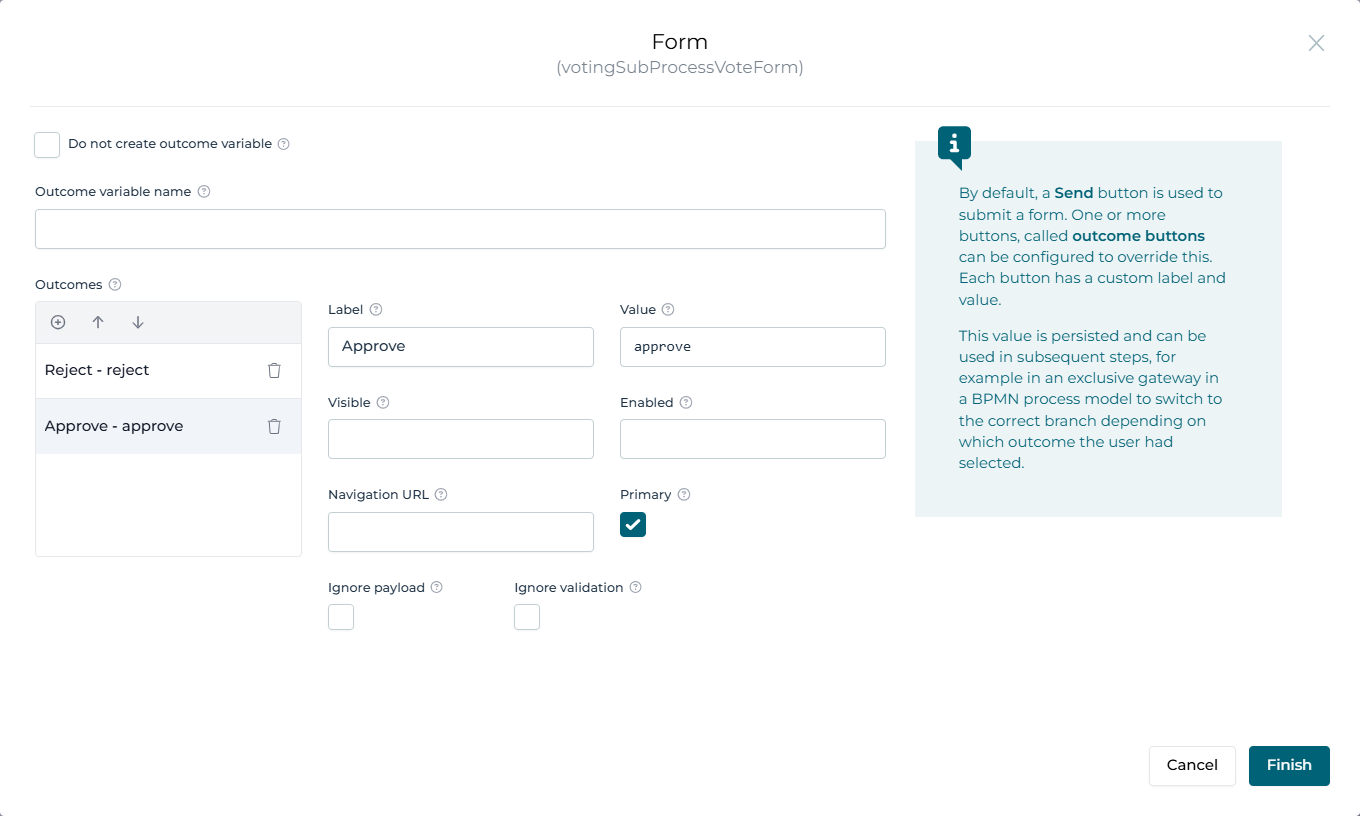
<img src="/files/wBQoTLBLsb3cNuFEBSYR" alt="" width="75%">

| Field                | Description                                                                                                                                                                                                                                                                           |
| -------------------- | ------------------------------------------------------------------------------------------------------------------------------------------------------------------------------------------------------------------------------------------------------------------------------------- |
| Label                | The text of the button.                                                                                                                                                                                                                                                               |
| Value                | <p>A value that is assigned to the outcome variable.</p><div data-gb-custom-block data-tag="hint" data-style="info" class="hint hint-info"><p>Use simple text to define values. Do not use variables for this field.</p></div>                                                        |
| Visible (Expression) | An expression that determines when the button becomes visible.                                                                                                                                                                                                                        |
| Enabled (Expression) | <p>An expression that determines when the button becomes enabled.</p><div data-gb-custom-block data-tag="hint" data-style="info" class="hint hint-info"><p>By default, a primary button becomes enabled when all the mandatory form fields are completed.</p></div>                   |
| Navigation URL       | <p>The URL where you are redirected after clicking the button.</p><div data-gb-custom-block data-tag="hint" data-style="success" class="hint hint-success"><p>You can use absolute or relative links and include variables, for example <em>/search?q={{searchTerm}}</em>.</p></div>  |
| Ignore payload       | Ignores the form data and any validation and just sends the outcome value.                                                                                                                                                                                                            |
| Ignore validation    | Ignores the form validation and just sends the payload and outcome value.                                                                                                                                                                                                             |
| Primary              | <p>The button replaces the default <strong>Submit</strong> button.</p><div data-gb-custom-block data-tag="hint" data-style="success" class="hint hint-success"><p>You don't need to assign any value to a primary button if you just want to change the text of the button.</p></div> |

## Outcome variables

Use the **Outcome variable name** to bind the value of a button to a process variable, for example `myVariableName`. By default, this variable is named `form_<form_key>_outcome`, where \<form\_key> is the model key of your form. You can then use the value to build conditions, for example `${vars:equals(form_myForm_outcome, "Approved")}` or `${form_myForm_outcome == "Approved"}`.


---

# Agent Instructions
This documentation is published with GitBook. GitBook is the documentation platform designed so that both humans and AI agents can read, navigate, and reason over technical content effectively. Learn more at gitbook.com.

## Querying This Documentation
If you need additional information that is not directly available in this page, you can query the documentation dynamically by asking a question.

Perform an HTTP GET request on the current page URL with the `ask` query parameter:

```
GET https://developer.collibra.com/workflows/designing-workflows/forms/form-outcomes.md?ask=<question>
```

The question should be specific, self-contained, and written in natural language.
The response will contain a direct answer to the question and relevant excerpts and sources from the documentation.

Use this mechanism when the answer is not explicitly present in the current page, you need clarification or additional context, or you want to retrieve related documentation sections.
