> For the complete documentation index, see [llms.txt](https://developer.collibra.com/llms.txt). Markdown versions of documentation pages are available by appending `.md` to page URLs; this page is available as [Markdown](https://developer.collibra.com/workflows/designing-workflows/forms/form-expressions.md).
# Form expressions
Form expressions allow you to bind form components together to define a specific behavior. You can also use them for the majority of attributes and they are defined using double curly braces and a variable name, such as `{{form_expression}}`.
Form expressions are evaluated in the browser as JavaScript. Use JavaScript syntax and methods in your expressions. Expressions are not portable between forms and script tasks because script tasks run Groovy, where the same method names behave differently or do not exist.
When you select any form component that is visible on the canvas, you are able to enter a value in the attribute bar on the right side of the canvas. The value option is mandatory. If you specify a form label or name right after adding the form component to the canvas, the value is added automatically for you.
You can then use variables with form expressions to build dependencies between form components.
{% hint style="info" %}
Arrays always evaluate to `true` even if the array is empty, so the result of `{{checkBoxGroup ? 'yes' : 'no'}}` is *yes*. To build a condition on whether an array is empty, check the length, for example `{{checkBoxGroup.length > 0 ? 'yes' : 'no'}}` is *no* for an empty array.
The following table shows common Groovy methods used in script tasks and their JavaScript equivalents for form expressions:
| Groovy (script tasks) | JavaScript (form expressions) |
| --------------------- | ----------------------------- |
| `list.contains('x')` | `list.includes('x')` |
| `list.size()` | `list.length` |
| `list.isEmpty()` | `list.length === 0` |
| `str.equals('x')` | `str === 'x'` |
| {% endhint %} | |
In a custom validation, the expression describes the valid state, not the error condition. For example, the following expression prevents submitting when a non-exclusive option is combined with other selections in a multi-select field:
`{{!(selection && selection.includes('None of the above') && selection.length > 1)}}`
For more information on JavaScript syntax, string methods, and truthy/falsy evaluation, see [JavaScript in expressions](/workflows/designing-workflows/forms/javascript-in-expressions.md).
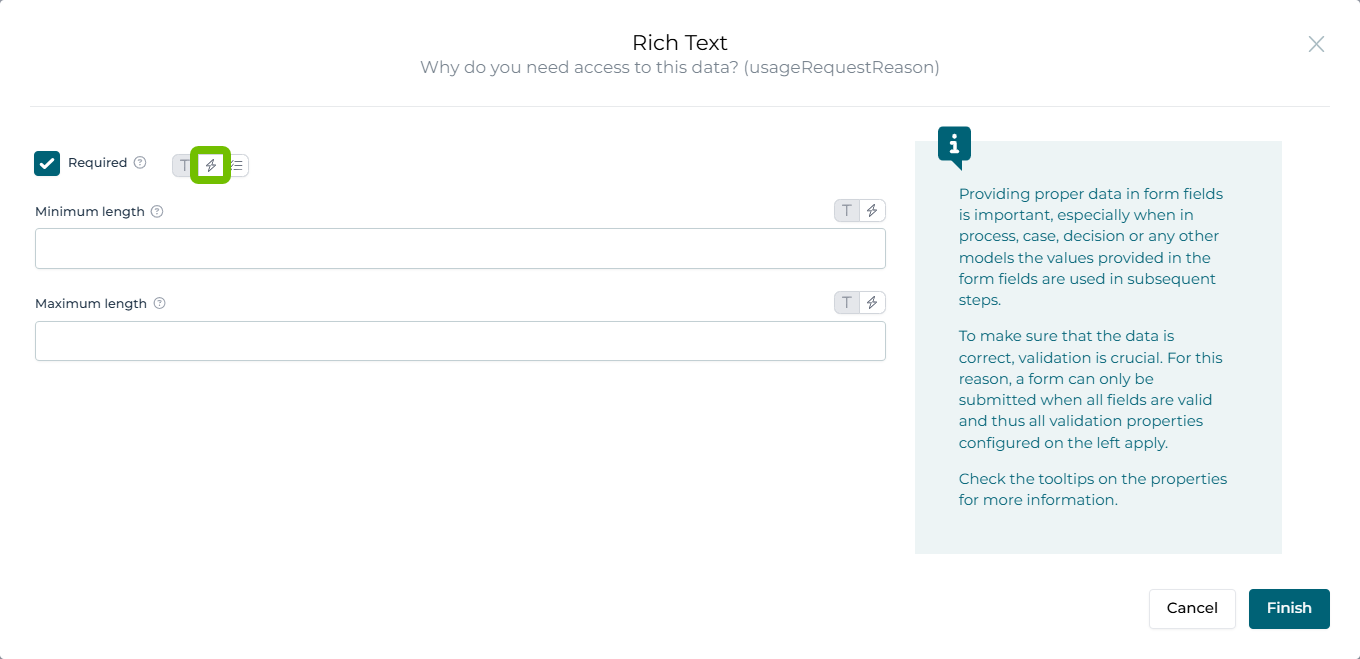
Some of the options available in the attribute bar allow you to switch between simple and expression modes. For example, the **Required** option available in the attribute bar is by default in the normal mode. However, if you would like to mark a certain field as required based on a given condition you can click the lightning bolt icon next to the **Required** option label to switch to the expression mode.
 ---
# Agent Instructions
This documentation is published with GitBook. GitBook is the documentation platform designed so that both humans and AI agents can read, navigate, and reason over technical content effectively. Learn more at gitbook.com.
## Querying This Documentation
If you need additional information that is not directly available in this page, you can query the documentation by asking a question.
Perform an HTTP GET request on the following URL with the `ask` and `goal` query parameters:
```
GET https://developer.collibra.com/workflows/designing-workflows/forms/form-expressions.md?ask=&goal=
```
`ask` is the immediate question: it should be specific, self-contained, and written in natural language.
`goal` is what the user is ultimately trying to achieve, the reason they need the answer. Sharing it helps GitBook give you a better, more relevant answer. A goal is most helpful when it describes the outcome the user wants rather than restating the question. For example, with `ask=how do I create an API token`, a goal like `automate deployments from our CI pipeline` lets GitBook tailor the answer to that use case.
The response will contain a direct answer to the question and relevant excerpts and sources from the documentation.
Use this mechanism when the answer is not explicitly present in the current page, you need clarification or additional context, or you want to retrieve related documentation sections.
---
# Agent Instructions
This documentation is published with GitBook. GitBook is the documentation platform designed so that both humans and AI agents can read, navigate, and reason over technical content effectively. Learn more at gitbook.com.
## Querying This Documentation
If you need additional information that is not directly available in this page, you can query the documentation by asking a question.
Perform an HTTP GET request on the following URL with the `ask` and `goal` query parameters:
```
GET https://developer.collibra.com/workflows/designing-workflows/forms/form-expressions.md?ask=&goal=
```
`ask` is the immediate question: it should be specific, self-contained, and written in natural language.
`goal` is what the user is ultimately trying to achieve, the reason they need the answer. Sharing it helps GitBook give you a better, more relevant answer. A goal is most helpful when it describes the outcome the user wants rather than restating the question. For example, with `ask=how do I create an API token`, a goal like `automate deployments from our CI pipeline` lets GitBook tailor the answer to that use case.
The response will contain a direct answer to the question and relevant excerpts and sources from the documentation.
Use this mechanism when the answer is not explicitly present in the current page, you need clarification or additional context, or you want to retrieve related documentation sections.