> For the complete documentation index, see [llms.txt](https://developer.collibra.com/llms.txt). Markdown versions of documentation pages are available by appending `.md` to page URLs; this page is available as [Markdown](https://developer.collibra.com/tutorials/start-a-workflow-when-a-definition-is-added.md).
# Start a workflow when a definition is added
You can configure a workflow definition to start the workflow when an attribute is added to an asset in your Collibra Platform.
 Further refinement of your filtering is only possible thorough a script task, once the workflow has started. Here, you compare the universally unique identifier (UUID) of the attribute type that started the workflow with the UUID of the **Definition** attribute type. You can adapt the scenario to suit your needs.
To get the UUID of the attribute that started the workflow, use a method of the Java Workflows API [**event** bean](/workflows/designing-workflows/processes/process-execution/beans/event-bean.md): `event.getEventResourceId()`
{% hint style="info" %}
Starting a workflow when new attributes are added to assets has the potential of impacting the performance of your environment, for example when you import large amounts of resources. Even if you refine the filtering to very particular cases, the workflow still needs to start for every new attribute that is added to an asset to be able to perform the script task.
{% endhint %}
## Example workflow
You can download the [**DefinitionAdded** example workflow](https://cdn.collibra.com/developer/DefinitionAdded.bpmn) and use it as a starting point for your own workflow.
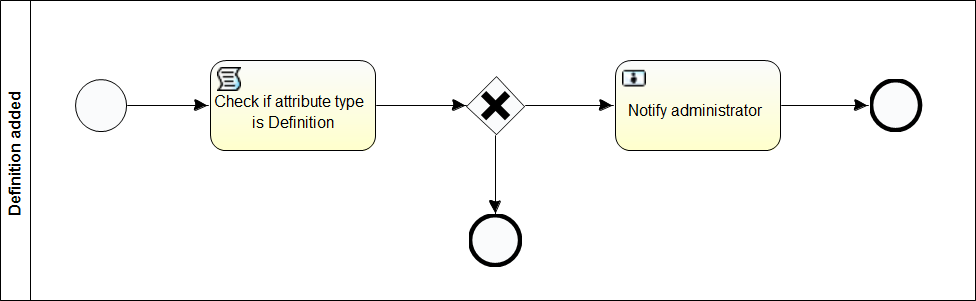
The workflow checks if the attribute that is added to an asset is a definition and assigns a task to users with the **Sysadmin** role. If the attribute is not a definition, the workflow ends.
Further refinement of your filtering is only possible thorough a script task, once the workflow has started. Here, you compare the universally unique identifier (UUID) of the attribute type that started the workflow with the UUID of the **Definition** attribute type. You can adapt the scenario to suit your needs.
To get the UUID of the attribute that started the workflow, use a method of the Java Workflows API [**event** bean](/workflows/designing-workflows/processes/process-execution/beans/event-bean.md): `event.getEventResourceId()`
{% hint style="info" %}
Starting a workflow when new attributes are added to assets has the potential of impacting the performance of your environment, for example when you import large amounts of resources. Even if you refine the filtering to very particular cases, the workflow still needs to start for every new attribute that is added to an asset to be able to perform the script task.
{% endhint %}
## Example workflow
You can download the [**DefinitionAdded** example workflow](https://cdn.collibra.com/developer/DefinitionAdded.bpmn) and use it as a starting point for your own workflow.
The workflow checks if the attribute that is added to an asset is a definition and assigns a task to users with the **Sysadmin** role. If the attribute is not a definition, the workflow ends.
 The start event form has two `string` process variables that can be changed from the Collibra Platform workflow definition page:
* The out-of-the-box UUID of the **Definition** attribute type:
* **Id**: *definitionId*
* **Default**: *00000000-0000-0000-0000-000000000202*
* A [candidate user expression](/workflows/designing-workflows/processes/shape-repository/user-task/candidate-user-expressions.md) for the users with a **Sysadmin** role. The variable is only needed for this particular example:
* **Id**: *adminUserExpression*
* **Default**: *role(Sysadmin)*
The Groovy script task performs the following operations:
* Assigns the UUID of the attribute that started the workflow to an attributeId variable.
* Creates a new **Attribute** object that corresponds to the attribute that started the workflow.
* Gets the UUID of the attribute type and assigns the value to the attributeTypeId variable.
* Gets the name of the asset that has the attribute and assigns the value to the assetName process variable.
* Gets the contents of the definition and assigns the value to the definitionText process variable.
* Compares the UUID of the attribute type with the UUID set by the definitionId process variable:
* If there is a match, the value `true` is assigned to the isDefinition process variable.
* If not, the value `false` is assigned to the isDefinition process variable.
```groovy
import com.collibra.dgc.core.api.model.instance.attribute.Attribute
def attributeId = event.getEventResourceId()
Attribute attribute = attributeApi.getAttribute(attributeId)
def attributeTypeId = attribute.getType().getId()
def assetName = attribute.getAsset().getName()
def definitionText = attribute.getValueAsString()
execution.setVariable("definitionText", definitionText)
execution.setVariable("assetName", assetName)
if (attributeTypeId == string2Uuid(definitionId)) {
execution.setVariable("isDefinition", true)
}
else {
execution.setVariable("isDefinition", false)
}
```
The exclusive gateway stops the workflow when the isDefinition process variable is `false`. When isDefinition is `true`, the workflow continues:
* In this example workflow, the users with the **Sysadmin** role receive a task, which notifies them that a definition has been added to an asset, including the name of the asset and the contents of the definition.
The start event form has two `string` process variables that can be changed from the Collibra Platform workflow definition page:
* The out-of-the-box UUID of the **Definition** attribute type:
* **Id**: *definitionId*
* **Default**: *00000000-0000-0000-0000-000000000202*
* A [candidate user expression](/workflows/designing-workflows/processes/shape-repository/user-task/candidate-user-expressions.md) for the users with a **Sysadmin** role. The variable is only needed for this particular example:
* **Id**: *adminUserExpression*
* **Default**: *role(Sysadmin)*
The Groovy script task performs the following operations:
* Assigns the UUID of the attribute that started the workflow to an attributeId variable.
* Creates a new **Attribute** object that corresponds to the attribute that started the workflow.
* Gets the UUID of the attribute type and assigns the value to the attributeTypeId variable.
* Gets the name of the asset that has the attribute and assigns the value to the assetName process variable.
* Gets the contents of the definition and assigns the value to the definitionText process variable.
* Compares the UUID of the attribute type with the UUID set by the definitionId process variable:
* If there is a match, the value `true` is assigned to the isDefinition process variable.
* If not, the value `false` is assigned to the isDefinition process variable.
```groovy
import com.collibra.dgc.core.api.model.instance.attribute.Attribute
def attributeId = event.getEventResourceId()
Attribute attribute = attributeApi.getAttribute(attributeId)
def attributeTypeId = attribute.getType().getId()
def assetName = attribute.getAsset().getName()
def definitionText = attribute.getValueAsString()
execution.setVariable("definitionText", definitionText)
execution.setVariable("assetName", assetName)
if (attributeTypeId == string2Uuid(definitionId)) {
execution.setVariable("isDefinition", true)
}
else {
execution.setVariable("isDefinition", false)
}
```
The exclusive gateway stops the workflow when the isDefinition process variable is `false`. When isDefinition is `true`, the workflow continues:
* In this example workflow, the users with the **Sysadmin** role receive a task, which notifies them that a definition has been added to an asset, including the name of the asset and the contents of the definition.
 ---
# Agent Instructions
This documentation is published with GitBook. GitBook is the documentation platform designed so that both humans and AI agents can read, navigate, and reason over technical content effectively. Learn more at gitbook.com.
## Querying This Documentation
If you need additional information that is not directly available in this page, you can query the documentation by asking a question.
Perform an HTTP GET request on the following URL with the `ask` and `goal` query parameters:
```
GET https://developer.collibra.com/tutorials/start-a-workflow-when-a-definition-is-added.md?ask=&goal=
```
`ask` is the immediate question: it should be specific, self-contained, and written in natural language.
`goal` is what the user is ultimately trying to achieve, the reason they need the answer. Sharing it helps GitBook give you a better, more relevant answer. A goal is most helpful when it describes the outcome the user wants rather than restating the question. For example, with `ask=how do I create an API token`, a goal like `automate deployments from our CI pipeline` lets GitBook tailor the answer to that use case.
The response will contain a direct answer to the question and relevant excerpts and sources from the documentation.
Use this mechanism when the answer is not explicitly present in the current page, you need clarification or additional context, or you want to retrieve related documentation sections.
---
# Agent Instructions
This documentation is published with GitBook. GitBook is the documentation platform designed so that both humans and AI agents can read, navigate, and reason over technical content effectively. Learn more at gitbook.com.
## Querying This Documentation
If you need additional information that is not directly available in this page, you can query the documentation by asking a question.
Perform an HTTP GET request on the following URL with the `ask` and `goal` query parameters:
```
GET https://developer.collibra.com/tutorials/start-a-workflow-when-a-definition-is-added.md?ask=&goal=
```
`ask` is the immediate question: it should be specific, self-contained, and written in natural language.
`goal` is what the user is ultimately trying to achieve, the reason they need the answer. Sharing it helps GitBook give you a better, more relevant answer. A goal is most helpful when it describes the outcome the user wants rather than restating the question. For example, with `ask=how do I create an API token`, a goal like `automate deployments from our CI pipeline` lets GitBook tailor the answer to that use case.
The response will contain a direct answer to the question and relevant excerpts and sources from the documentation.
Use this mechanism when the answer is not explicitly present in the current page, you need clarification or additional context, or you want to retrieve related documentation sections.