> For the complete documentation index, see [llms.txt](https://developer.collibra.com/llms.txt). Markdown versions of documentation pages are available by appending `.md` to page URLs; this page is available as [Markdown](https://developer.collibra.com/tutorials/collibra-rest-api-authentication-with-json-web-token.md).

# Collibra REST API authentication with JSON Web Token

In this tutorial you check the prerequisites for JSON Web Token (JWT) authentication with Collibra Platform, obtain the access token and test the authentication.

{% hint style="info" %}
Almost all of the Collibra API calls require authentication.
{% endhint %}

## How JWT authentication works

You can use JSON Web Token (JWT) authentication for your applications that interact with the Collibra REST API.

{% tabs %}
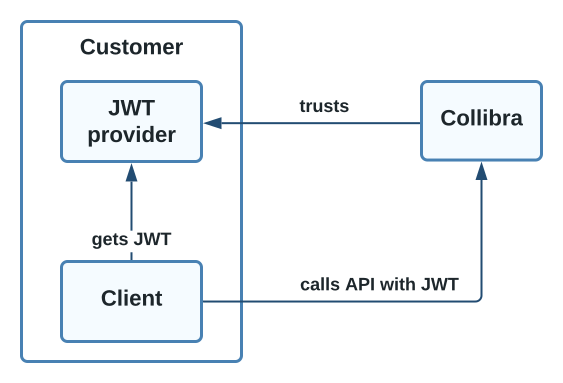
{% tab title="JWT authentication components" %} <img src="/files/qtgPn3GjzIFUac2t7tOJ" alt="A diagram depicting Collibra JWT authentication components" width="50%">
{% endtab %}

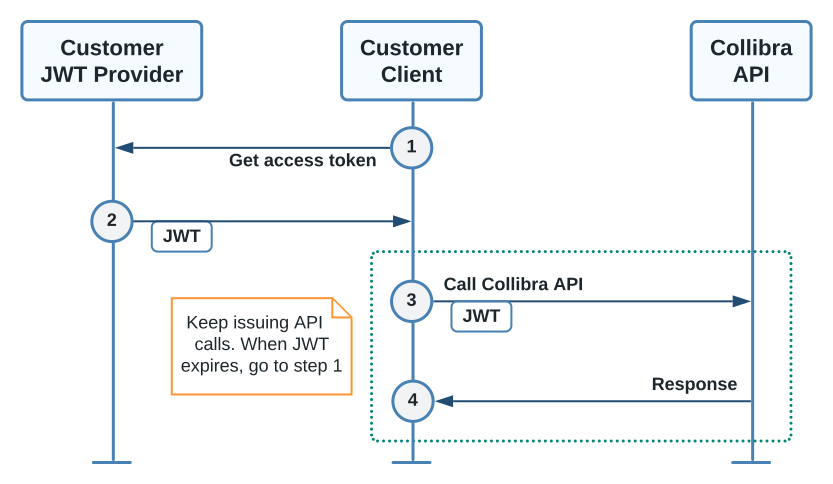
{% tab title="JWT authentication sequence" %} <img src="/files/rro5fuIv8CQwuhGWORk2" alt="A diagram depicting Collibra JWT authentication sequence" width="75%">
{% endtab %}

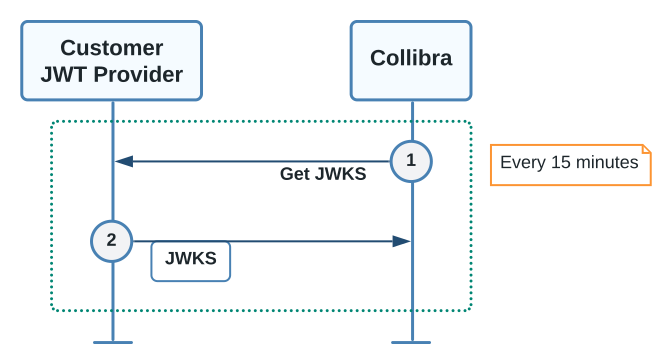
{% tab title="Read customer JWK Set sequence" %} <img src="/files/yWBUS84WWMNKLSkfnuHQ" alt="A diagram depicting how Collibra reads a customer JWK Set" width="50%">
{% endtab %}
{% endtabs %}

During this process, your application requests an access token from your Identity Provider (IdP). The IdP acts as the authentication server and returns a signed JWT access token. When your application makes API calls to Collibra, it provides the JWT access token as a **Bearer** token in the HTTP **Authorization** header.

```bash
curl -H 'Authorization: Bearer <your_token>' ...
```

Benefits of using JWT token authentication include:

* Keeping the authentication details at the IdP and separate from Collibra.
* Simplifying your security management.
* Limiting the time a token is valid for.

## Prerequisites

* You have an Identity Provider (IdP) that supports issuing JWT tokens.
* You have configured the JWT section of the [Collibra Console service configuration](https://productresources.collibra.com/docs/collibra/latest/Default.htm#cshid=DOC0444).
* You have created a Collibra user for the client application with the user name provided by the IdP.

  <div data-gb-custom-block data-tag="hint" data-style="success" class="hint hint-success"><p>You can usually find the user name in the <strong>sub</strong> subject field.</p></div>

## Obtain the token

Your application must provide the authentication token as a **Bearer** token in the HTTP **Authorization** header. Use the [OAuth 2.0 client credentials flow](https://www.oauth.com/oauth2-servers/access-tokens/client-credentials/) to request a token.

## Test the JWT configuration

Make any API call to Collibra to test the correct JWT authentication setup, for example `GET https://<your_collibra_url>/rest/2.0/communities`.

### Postman example

{% stepper %}
{% step %}
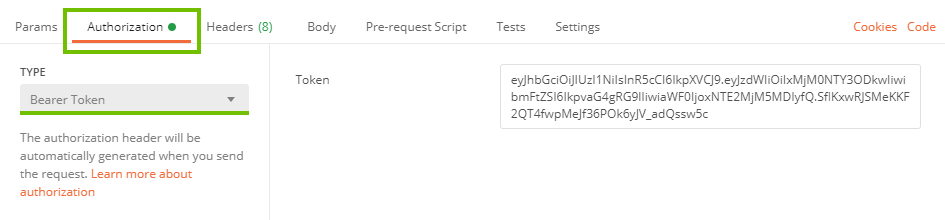
Go to the **Authorization** tab.
{% endstep %}

{% step %}
From the **Type** drop-down menu, select **Bearer Token**.
{% endstep %}

{% step %}
Fill in the **Token** field.
{% endstep %}
{% endstepper %}

<img src="/files/6bvh05b5QOlGKkdrJzpy" alt="" width="75%">

### curl example

```bash
curl -H 'Authorization: Bearer <your_token>' ...
```

## Response codes

| Code | Meaning                                                       |
| ---- | ------------------------------------------------------------- |
| 204  | The request has been authorized.                              |
| 401  | The request has not been authorized. See payload for details. |

## JWT Troubleshooting

The following table contains JWT authentication error codes that may appear in the body of the **401 Unauthorized** HTTP response. You can use the error codes to determine the appropriate course of action for your application.

| Error code           | Description                                                                                                                                                                                             | Possible action                                                                                                                     |
| -------------------- | ------------------------------------------------------------------------------------------------------------------------------------------------------------------------------------------------------- | ----------------------------------------------------------------------------------------------------------------------------------- |
| malformedToken       | The JWT token is incorrectly encoded or has an incorrect syntax.                                                                                                                                        | Check your IdP configuration to make sure it is returning a token in JWT format.                                                    |
| expiredToken         | The JWT token has expired.                                                                                                                                                                              | In your application, request a new token from the IdP and retry.                                                                    |
| invalidToken         | <p>The JWT token is invalid.</p><p>Common causes are:</p><ul><li>Bad signature.</li><li>Wrong audience.</li><li>Wrong issuer.</li><li>Wrong media type.</li><li>Disallowed signing algorithm.</li></ul> | Check your IdP and Collibra JWT configuration to make sure the settings are consistent.                                             |
| unableToProcessToken | The JWT token could not be processed.                                                                                                                                                                   | Check your IdP and Collibra JWT configuration and if the problem persists contact [Collibra Support](https://support.collibra.com). |

### Diagnose rejected JWT tokens

To diagnose configuration issues, inspect each of the three JWT sections separated by a period (.):

<table><thead><tr><th>Token</th><th>Description</th></tr></thead><tbody><tr><td><pre><code>eyJhbGciOiJIUzI1NiIsInR5cCI6IkpXVCJ9.eyJzdWIiOiIxMjM0NTY3ODkwIiwibmFtZSI6IkpvaG4gRG9lIiwiaWF0IjoxNTE2MjM5MDIyfQ.SflKxwRJSMeKKF2QT4fwpMeJf36POk6yJV_adQs
</code></pre></td><td><ul><li>The first section is a base-64 encoded JSON header.</li><li>The second section is base-64 encoded JSON payload.</li><li>The third section is a digital signature of the header and payload that proves the authenticity of the token.</li></ul></td></tr></tbody></table>

An example of why a token may be rejected is if the **iss** issuer and **aud** audience fields from the token payload do not match the Collibra configuration.

## Additional resources

* Read the [JSON Web Token authentication](https://productresources.collibra.com/docs/collibra/latest/Default.htm#cshid=DOC0774) section of the Collibra Installation and Configuration Guide.
* Read the [Collibra JSON Web Token authentication guide](https://developer.collibra.com/tutorials/rest-api-json-web-token/).
* Consult the REST API documentation provided with your version of Collibra Platform at https\://\<your\_collibra\_url>/docs/index.html.
* Read the Collibra Administration Guide [API documentation](https://developer.collibra.com/api#apis).
* Learn about basic authentication: [Collibra REST API authentication](https://developer.collibra.com/tutorials/rest-api-authentication/).


---

# Agent Instructions
This documentation is published with GitBook. GitBook is the documentation platform designed so that both humans and AI agents can read, navigate, and reason over technical content effectively. Learn more at gitbook.com.

## Querying This Documentation
If you need additional information that is not directly available in this page, you can query the documentation dynamically by asking a question.

Perform an HTTP GET request on the current page URL with the `ask` query parameter:

```
GET https://developer.collibra.com/tutorials/collibra-rest-api-authentication-with-json-web-token.md?ask=<question>
```

The question should be specific, self-contained, and written in natural language.
The response will contain a direct answer to the question and relevant excerpts and sources from the documentation.

Use this mechanism when the answer is not explicitly present in the current page, you need clarification or additional context, or you want to retrieve related documentation sections.