> For the complete documentation index, see [llms.txt](https://developer.collibra.com/llms.txt). Markdown versions of documentation pages are available by appending `.md` to page URLs; this page is available as [Markdown](https://developer.collibra.com/tutorials/collibra-json-web-token-authentication-guide.md).

# Collibra JSON Web Token authentication guide

This tutorial is a complete guide to REST API authentication using a JSON Web Token.

{% hint style="info" %}
Almost all of the Collibra API calls require authentication.
{% endhint %}

{% hint style="success" %}
To learn about basic authentication, see [Collibra REST API authentication](https://developer.collibra.com/tutorials/rest-api-authentication/).
{% endhint %}

## How JWT authentication works

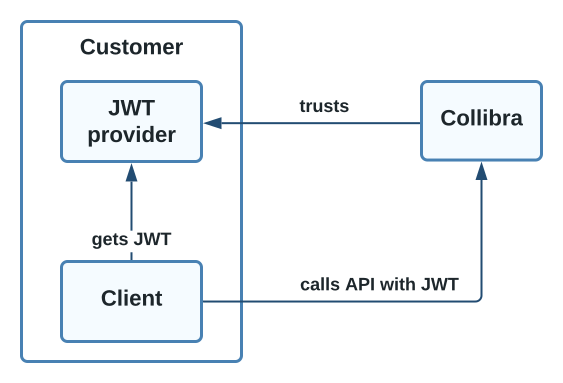
You can use JSON Web Token (JWT) authentication for your applications that interact with the Collibra REST API.

{% tabs %}
{% tab title="JWT authentication components" %} <img src="/files/qtgPn3GjzIFUac2t7tOJ" alt="A diagram depicting Collibra JWT authentication components" width="50%">
{% endtab %}

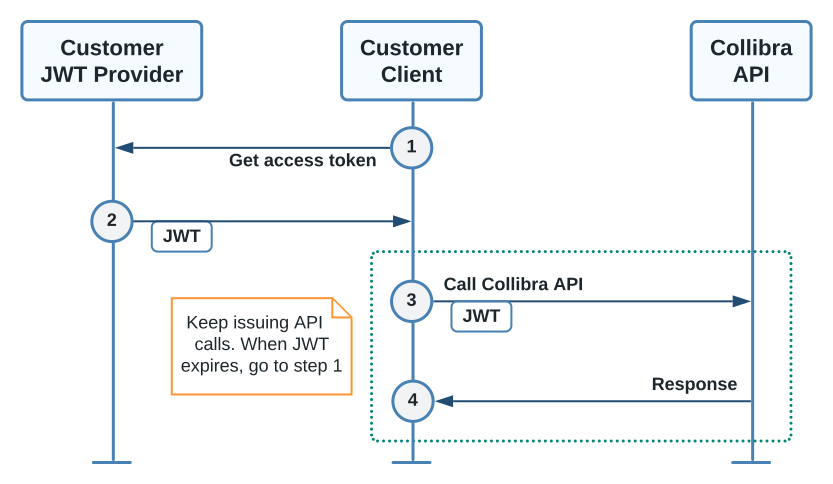
{% tab title="JWT authentication sequence" %} <img src="/files/rro5fuIv8CQwuhGWORk2" alt="A diagram depicting Collibra JWT authentication sequence" width="75%">
{% endtab %}

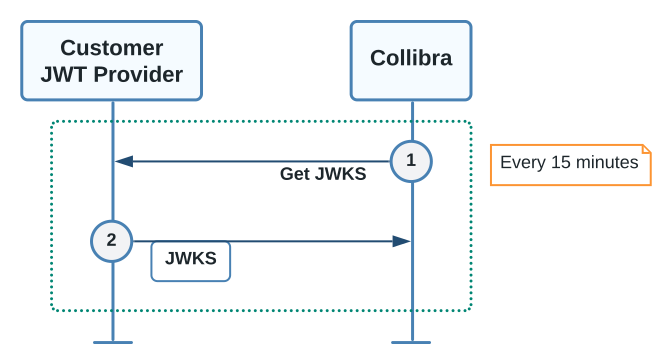
{% tab title="Read customer JWK Set sequence" %} <img src="/files/yWBUS84WWMNKLSkfnuHQ" alt="A diagram depicting how Collibra reads a customer JWK Set" width="50%">
{% endtab %}
{% endtabs %}

During this process, your application requests an access token from your Identity Provider (IdP). The IdP acts as the authentication server and returns a signed JWT access token. When your application makes API calls to Collibra, it provides the JWT access token as a **Bearer** token in the HTTP **Authorization** header.

```bash
curl -H 'Authorization: Bearer <your_token>' ...
```

Benefits of using JWT token authentication include:

* Keeping the authentication details at the IdP and separate from Collibra.
* Simplifying your security management.
* Limiting the time a token is valid for.

## Collibra minimum versions

JWT authentication is available starting with the following versions:

* Collibra Platform 2020.11.
* Collibra Data Governance Center 5.7.7-1.

## Set up and use JWT

The following table summarizes acquiring and using JWT in Collibra REST API requests.

| Process                                            | Steps                                                                                                                                                                                                                                                                                                                                                                                                                                                                                                                                                                                                                                                                                    |
| -------------------------------------------------- | ---------------------------------------------------------------------------------------------------------------------------------------------------------------------------------------------------------------------------------------------------------------------------------------------------------------------------------------------------------------------------------------------------------------------------------------------------------------------------------------------------------------------------------------------------------------------------------------------------------------------------------------------------------------------------------------- |
| Initial setup                                      | <ol><li>Create a client credential account with a secret in your IdP.</li><li>Determine the JSON Web Key Set (JWKS) endpoint URL for your IdP.</li><li><a href="https://productresources.collibra.com/docs/collibra/latest/Default.htm#cshid=DOC0773">Register the JWKS endpoint</a> with Collibra.</li><li><p><a href="https://productresources.collibra.com/docs/collibra/latest/Default.htm#cshid=DOC0655">Create a user</a> in Collibra for your client application account.</p><div data-gb-custom-block data-tag="hint" data-style="success" class="hint hint-success"><p>Provide a meaningful first and last name to identify that this is a service account.</p></div></li></ol> |
| When your application starts                       | <ol><li>Authenticate your client application with your IdP.</li><li>Save the returned access token for use in REST API calls.</li></ol>                                                                                                                                                                                                                                                                                                                                                                                                                                                                                                                                                  |
| When your application calls the Collibra REST APIs | <ol><li>Include the JWT token in the authorization HTTP header as a bearer token.</li><li>If the API call responds with <strong>unauthorized</strong>, the access token or JWKS credentials may have expired. Re-authenticate and retry the request.</li></ol>                                                                                                                                                                                                                                                                                                                                                                                                                           |

## JWT dependencies on your Identity Provider

The following details must be provided by your IdP in the JWT token for Collibra to accept the token.

| Section   | Field                                                                                                                                                                                                                                                                                                                                                       | Description                                                                                                                                                                                                                                     |
| --------- | ----------------------------------------------------------------------------------------------------------------------------------------------------------------------------------------------------------------------------------------------------------------------------------------------------------------------------------------------------------- | ----------------------------------------------------------------------------------------------------------------------------------------------------------------------------------------------------------------------------------------------- |
| Header    | alg                                                                                                                                                                                                                                                                                                                                                         | <p>The encryption algorithm.</p><p>Collibra supports all standard encryption algorithms.</p>                                                                                                                                                    |
| kid       | <p>The JWKS identifier of the public key used to sign the JWT token.</p><p>An identity provider may have multiple public key certificates, for example multiple valid keys may exist while a key rotation is in progress.</p>                                                                                                                               |                                                                                                                                                                                                                                                 |
| typ       | <p>Optional field that defines the JWT type.</p><div data-gb-custom-block data-tag="hint" data-style="success" class="hint hint-success"><p>Use the MIME type format, for example <em>application/jwt</em> or <em>application/secevent+jwt</em> with the <em>application/</em> prefix removed, for example <em>jwt</em> or <em>secevent+jwt</em>.</p></div> |                                                                                                                                                                                                                                                 |
| Payload   | iss                                                                                                                                                                                                                                                                                                                                                         | <p>The issuer of the token.</p><p>This field is used to check the token comes from the expected IdP.</p>                                                                                                                                        |
| exp       | The token expiry time.                                                                                                                                                                                                                                                                                                                                      |                                                                                                                                                                                                                                                 |
| iat       | The time the token was issued.                                                                                                                                                                                                                                                                                                                              |                                                                                                                                                                                                                                                 |
| sub       | The subject or the principal ID.                                                                                                                                                                                                                                                                                                                            |                                                                                                                                                                                                                                                 |
| Signature |                                                                                                                                                                                                                                                                                                                                                             | <p>The digital signature of the header and payload.</p><p>The signature verifies the message did not change along the way. In the case of tokens signed with a private key, the signature also verifies the authenticity of the JWT sender.</p> |

## Configure JWT settings

To enable or change the JSON Web Token configuration:

{% stepper %}
{% step %}
Open Collibra Console.\ <i class="fa-chevrons-right">:chevrons-right:</i> Collibra Console opens with the **Infrastructure** page.
{% endstep %}

{% step %}
In the tab pane, expand an environment to show its services.
{% endstep %}

{% step %}
In the tab pane, click the Data Governance Center service of that environment.
{% endstep %}

{% step %}
Click **Configuration**.
{% endstep %}

{% step %}
Click **Edit configuration**.
{% endstep %}

{% step %}
In the **JWT** section, make the necessary changes.

| Setting                      | Description                                                                                                                                                                                                                                                                                                                                                                                                                                                                                                 |
| ---------------------------- | ----------------------------------------------------------------------------------------------------------------------------------------------------------------------------------------------------------------------------------------------------------------------------------------------------------------------------------------------------------------------------------------------------------------------------------------------------------------------------------------------------------- |
| JSON Web Key Set URL         | <p>The URL to retrieve public key information needed to verify the authenticity of JSON Web Tokens (JWTs), issued by an authorization server.</p><p>This setting is required to enable JWT authentication.</p>                                                                                                                                                                                                                                                                                              |
| JWT Token Types              | <p>A case-insensitive comma-separated list of accepted JWT media types coming in the <strong>typ</strong> header parameter.</p><p>Leave blank if the authorization server does not provide a media type parameter.</p><p>The default values is <strong>at+jwt,jwt</strong>.</p>                                                                                                                                                                                                                             |
| JWT Algorithms               | <p>A comma-separated list of accepted JWT algorithms coming in the <strong>alg</strong> header parameter. See <a href="https://tools.ietf.org/html/rfc7518#section-3.1"><https://tools.ietf.org/html/rfc7518#section-3.1></a> for details.</p><p>Leave blank to accept all digital signature algorithms.</p>                                                                                                                                                                                                |
| JWT Issuer                   | <p>The accepted issuer coming in the <strong>iss</strong> JWT claim.</p><p>Leave blank if the authorization server does not provide an issuer claim.</p>                                                                                                                                                                                                                                                                                                                                                    |
| JWT Audience                 | <p>A comma-separated list of accepted audience values for the <strong>aud</strong> claim.</p><p>The value for this field is a configuration setting in your authorization server, which identifies your Collibra environment as the intended recipient of the JWT.</p><p>Leave blank if the authorization server does not provide an audience claim.</p>                                                                                                                                                    |
| JWT Principal ID Claim Name. | <p>The name of the JWT claim containing the principal's identity. See <a href="https://tools.ietf.org/html/rfc7519#section-4.1.2"><https://tools.ietf.org/html/rfc7519#section-4.1.2></a> for details.</p><p>Defaults to the standard subject claim, <strong>sub</strong>.</p><p>Change this setting only if your authorization server has other means of identifying the principal, for example, a <strong>client\_id</strong> claim.</p><p>This setting is required if JWT authentication is enabled.</p> |
| JWT Maximum Clock Skew       | <p>The maximum acceptable difference in seconds between the clocks of the machines running the authorization server and Collibra.</p><p>Differences smaller than the given amount are ignored when performing time comparisons for token validation.</p><p>The default value is 60 seconds if left blank.</p>                                                                                                                                                                                               |
| {% endstep %}                |                                                                                                                                                                                                                                                                                                                                                                                                                                                                                                             |

{% step %}
Click Save all.
{% endstep %}

{% step %}
Restart the environment to apply your changes. See [Stop an environment](https://productresources.collibra.com/docs/collibra/latest/Default.htm#cshid=DOC0512) and [Start an environment](https://productresources.collibra.com/docs/collibra/latest/Default.htm#cshid=DOC0510).
{% endstep %}
{% endstepper %}

## JWT troubleshooting

The following table contains JWT authentication error codes that may appear in the body of the **401 Unauthorized** HTTP response. You can use the error codes to determine the appropriate course of action for your application.

| Error code           | Description                                                                                                                                                                                             | Possible action                                                                                                                     |
| -------------------- | ------------------------------------------------------------------------------------------------------------------------------------------------------------------------------------------------------- | ----------------------------------------------------------------------------------------------------------------------------------- |
| malformedToken       | The JWT token is incorrectly encoded or has an incorrect syntax.                                                                                                                                        | Check your IdP configuration to make sure it is returning a token in JWT format.                                                    |
| expiredToken         | The JWT token has expired.                                                                                                                                                                              | In your application, request a new token from the IdP and retry.                                                                    |
| invalidToken         | <p>The JWT token is invalid.</p><p>Common causes are:</p><ul><li>Bad signature.</li><li>Wrong audience.</li><li>Wrong issuer.</li><li>Wrong media type.</li><li>Disallowed signing algorithm.</li></ul> | Check your IdP and Collibra JWT configuration to make sure the settings are consistent.                                             |
| unableToProcessToken | The JWT token could not be processed.                                                                                                                                                                   | Check your IdP and Collibra JWT configuration and if the problem persists contact [Collibra Support](https://support.collibra.com). |

## Additional resources

* Read the [JSON Web Token authentication](https://productresources.collibra.com/docs/collibra/latest/Default.htm#cshid=DOC0774) section of the Collibra Installation and Configuration Guide.
* Read the [Collibra REST API authentication with JSON Web Token](https://developer.collibra.com/tutorials/rest-api-authentication-jwt/) tutorial.
* Consult the REST API documentation provided with your version of Collibra Platform at https\://\<your\_collibra\_url>/docs/index.html.
* Read the Collibra Administration Guide [API documentation](https://developer.collibra.com/api#apis).
* Learn about basic authentication: [Collibra REST API authentication](https://developer.collibra.com/tutorials/rest-api-authentication/).


---

# Agent Instructions
This documentation is published with GitBook. GitBook is the documentation platform designed so that both humans and AI agents can read, navigate, and reason over technical content effectively. Learn more at gitbook.com.

## Querying This Documentation
If you need additional information that is not directly available in this page, you can query the documentation dynamically by asking a question.

Perform an HTTP GET request on the current page URL with the `ask` query parameter:

```
GET https://developer.collibra.com/tutorials/collibra-json-web-token-authentication-guide.md?ask=<question>
```

The question should be specific, self-contained, and written in natural language.
The response will contain a direct answer to the question and relevant excerpts and sources from the documentation.

Use this mechanism when the answer is not explicitly present in the current page, you need clarification or additional context, or you want to retrieve related documentation sections.
