> For the complete documentation index, see [llms.txt](https://developer.collibra.com/llms.txt). Markdown versions of documentation pages are available by appending `.md` to page URLs; this page is available as [Markdown](https://developer.collibra.com/tutorials/collibra-api-task-workflow.md).
# Collibra API task workflow
This tutorial explains how to use the **Collibra API task** in a workflow to create a community in Collibra. You learn how to construct a JSON request body dynamically, send it to the Collibra Core REST API, and handle potential validation errors.
## Learning objectives
* Configure a user task to collect community details.
* Build a dynamic JSON request body using the Groovy **JsonBuilder** in a script task.
* Use the **Collibra API task** to interact with the Collibra Core REST API.
* Implement error handling for API responses using an **Error Boundary Event** and **JsonSlurper**.
## Prerequisites
* Access to a Collibra environment with the Workflow Designer.
* Familiarity with creating and publishing workflows.
* Basic understanding of Groovy scripting.
* Basic understanding of JSON.
* Permissions to create communities in Collibra.
## Workflow overview
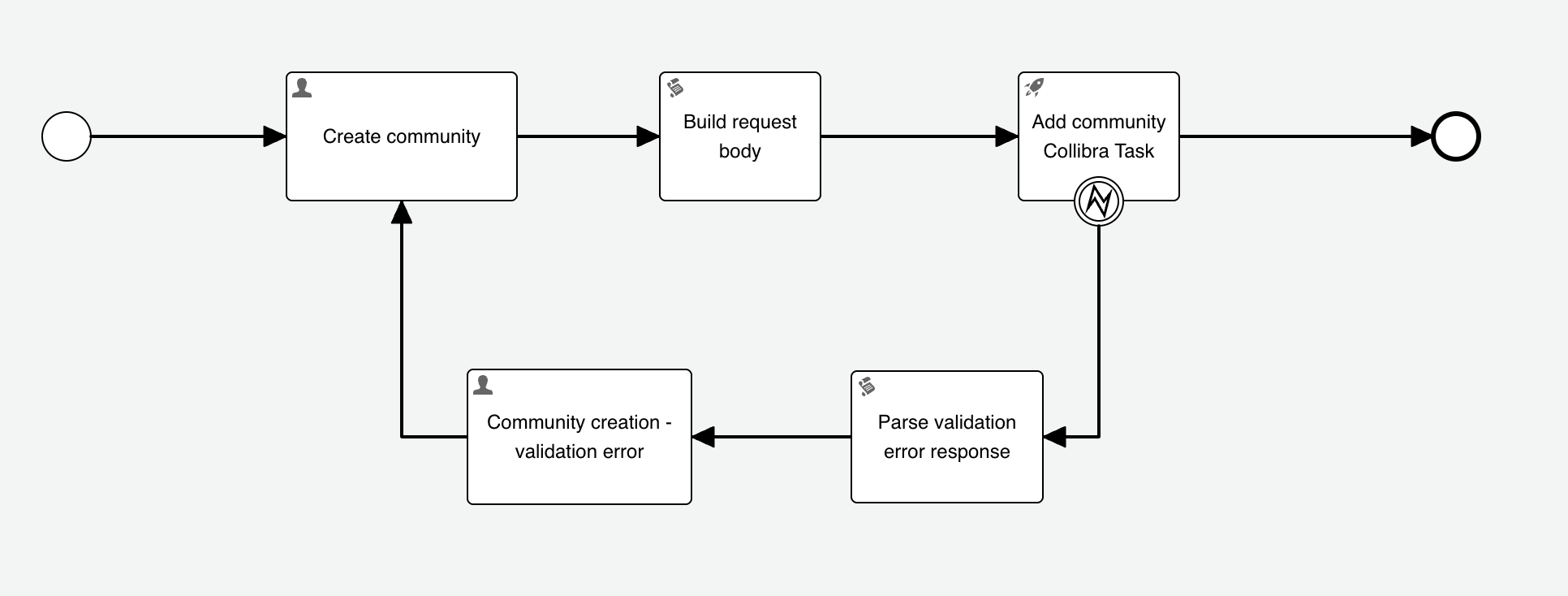
This sample workflow automates the creation of a community in Collibra. If a validation error occurs during the community creation process, the workflow provides an opportunity to correct the community details and retry the creation.
The workflow includes the following main components:
* **User task** - *Create community*: Collects the name, description, and parent community ID from the user to create a new community.
* **Script task** - *Build request body*: Constructs the JSON payload required by the Collibra Communities API using the user-provided details.
* **Collibra API task** - *Add community*: Sends the constructed JSON payload to the Collibra environment to create the community.
* **Error Boundary Event** - *on Add community*: Catches specific HTTP error codes returned by the Collibra API.
* **Script task** - *Parse validation error response*: Parses the error response from the API.
* **User task** - *Community creation - validation error*: Presents the error message to the user and allows retry.
## Create a user task for input
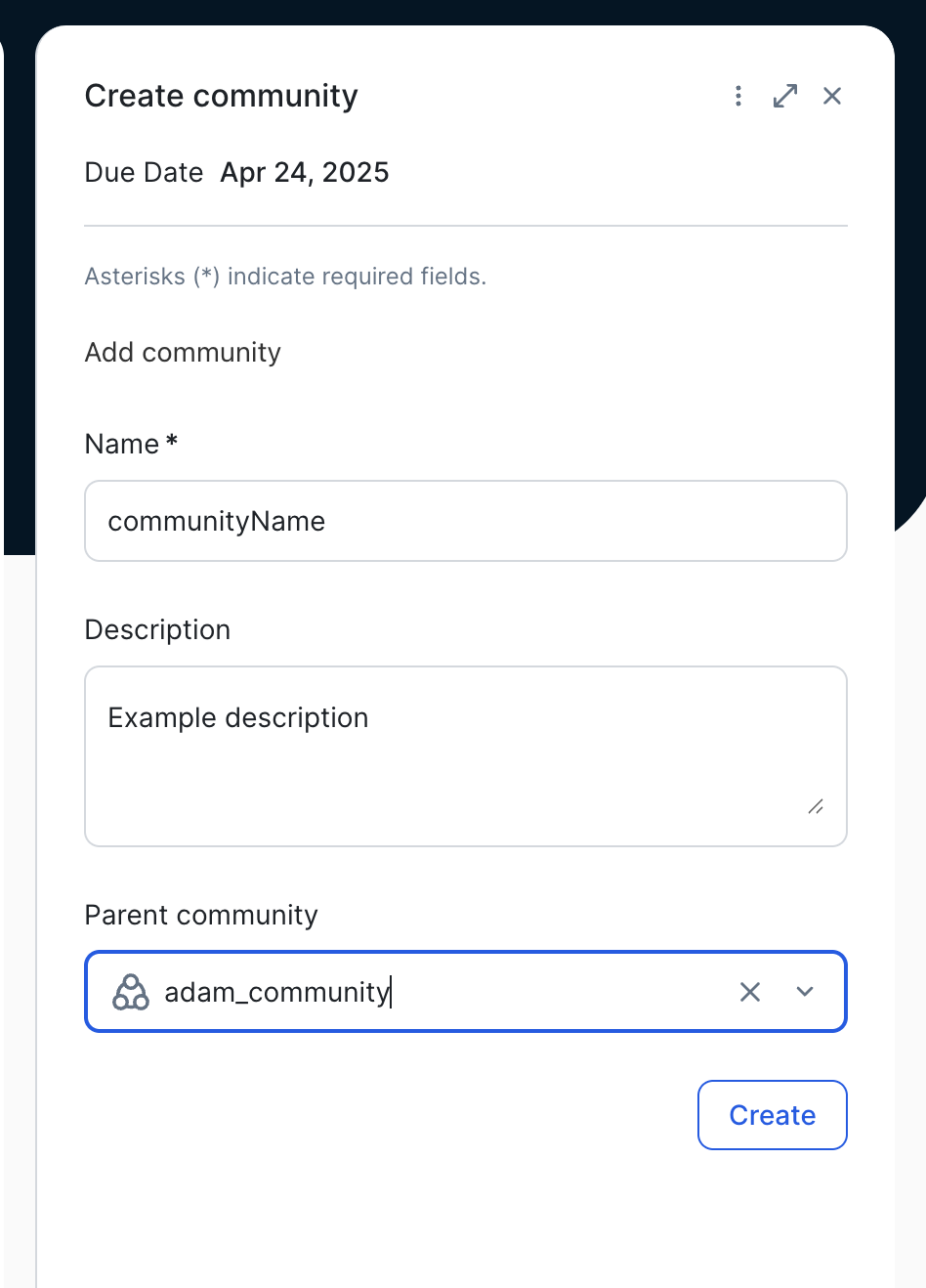
Start the workflow with a user task to gather the necessary information for the new community:
1. Add a **User task** to your workflow and name it *Create community*.
2. Configure the task form to collect the following information:
* **Text** - *Community Name*: Map this to a *communityName* variable.
* **Multiline Text** - *Description*: Map this to a *description* variable.
* **Community** - *Parent Community ID*: Map this to a *parentCommunity* variable.
## Build the API request body
After the user provides the community details, use a script task to construct the JSON request body dynamically:
1. Add a **Script task** after the **Create community** user task and name it *Build request body*.
2. In the script task, enter the following Groovy code. This code uses **JsonBuilder** to create the JSON payload. Optional fields are only added if a value is present in the corresponding process variable.
```groovy
import groovy.json.JsonBuilder
JsonBuilder json = new JsonBuilder()
json {
name communityName
if (execution.getVariable("description")) {
description execution.getVariable("description")
}
if (execution.getVariable("parentCommunity")) {
parentId execution.getVariable("parentCommunity")
}
}
String jsonBody = json.toPrettyString()
execution.setVariable("cummunityRequest", jsonBody)
```
Explanation:
* **JsonBuilder** helps create JSON objects programmatically.
* The **name** field is always included.
* The **description** and **parentId** fields are conditionally added if their corresponding process variables, **description** and **parentCommunity**, have values.
* The **toPrettyString()** method formats the JSON for readability.
* The resulting JSON string is stored in the **communityRequest** workflow variable.
### The JSON output
Given the following variable values:
* **communityName** = "Sample Community"
* **description** = "This is a sample community description."
* **parentCommunity** = "00000000-0000-0000-0000-000000900001"
The **communityRequest** variable will contain the following JSON object:
```json
{
"communityName": "Sample Community",
"description": "This is a sample community description.",
"parentCommunity": "00000000-0000-0000-0000-000000900001",
}
```
## Call the Collibra API
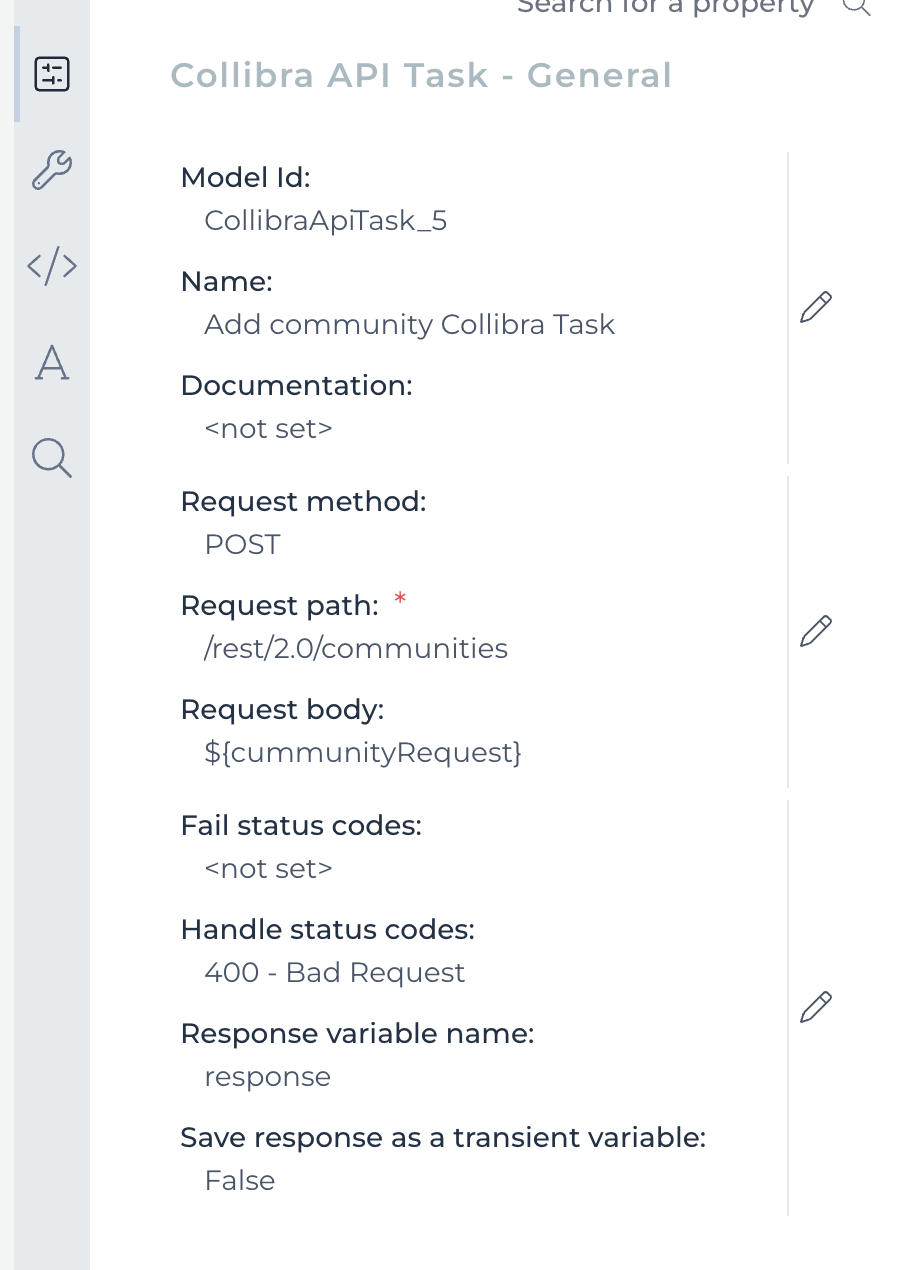
Use a **Collibra API task** to send the prepared JSON request to the Collibra Core REST API endpoint for creating communities:
1. Add a **Collibra API task** activity after the **Build request body** script task and name it *Add community*.
2. Configure the task properties:
* **Request Path**: */communities*. This path corresponds to the **POST /communities** endpoint of the Collibra Core REST API for creating communities. The host is added automatically by the Collibra API task.
* **Request Body**: Enter the **communityRequest** process variable.
* **Handle Status Code**: *400*. This specifies that if the API returns an HTTP 400 Bad Request status code, the workflow should trigger the associated error handling path.
* **Response Variable Name**: *response*. The full API response body will be stored in this process variable.
## Implement error handling
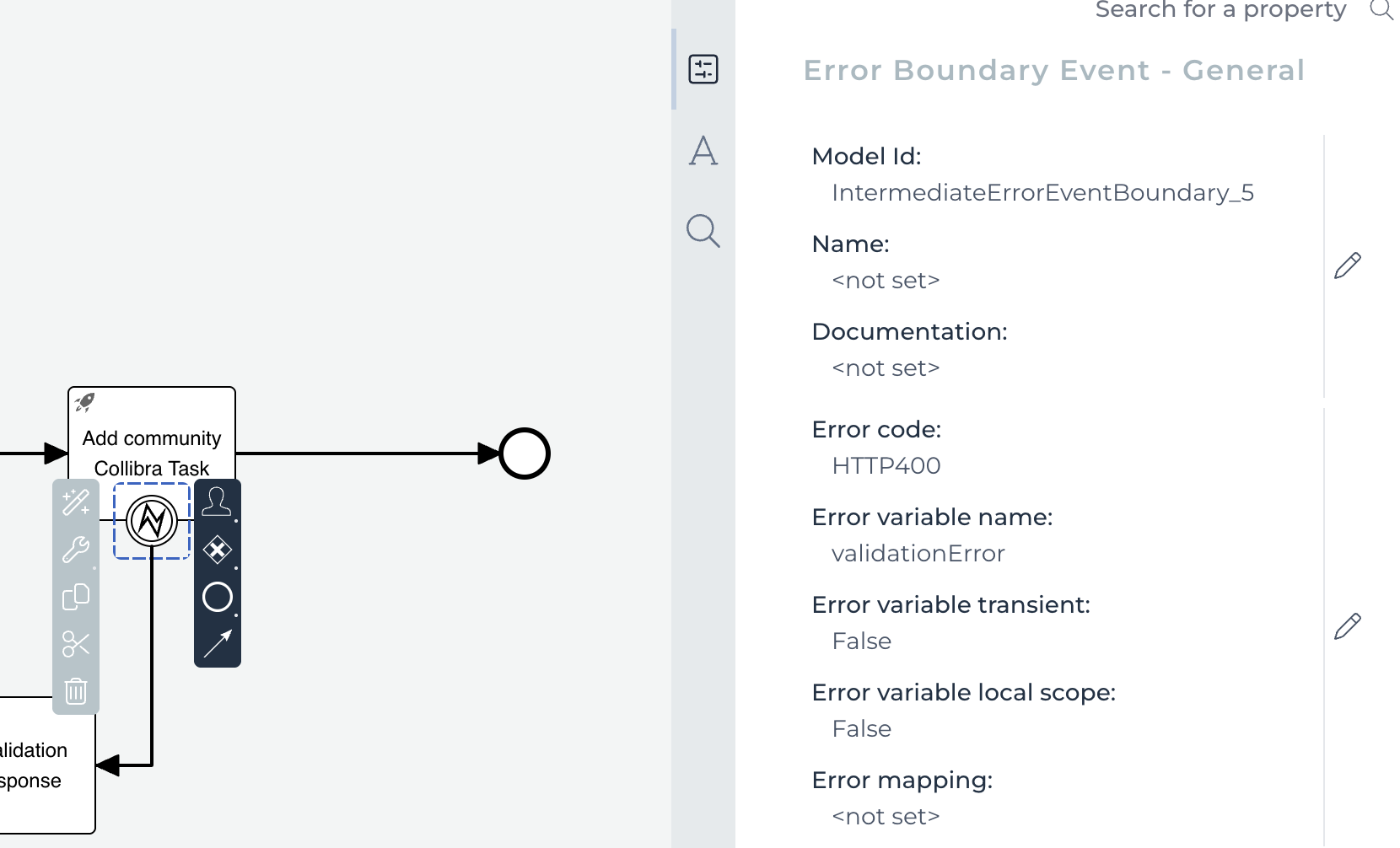
Configure an **Error Boundary Event** on the **Add community** task to catch specific API errors, such as validation failures:
1. Attach an **Error Boundary Event** to the **Add community** task.
2. Configure the event properties:
* **Error code**: *HTTP400*. This matches the HTTP status code specified in the **Handle Status Code** property of the **Add community** task. When a 400 error occurs, this error boundary event will be triggered.
* **Error variable name**: *validationError*.
## Parse validation errors and allow retry
When an HTTP 400 error occurs, the API typically returns a JSON response containing details about the validation error. Use a script task to parse this response and provide feedback to the user:
{% stepper %}
{% step %}
Connect the **Error Boundary Event** to a **Script task** and name it *Parse validation error response*.
{% endstep %}
{% step %}
In this script task, enter the following Groovy code. This code uses **JsonSlurper** to parse the **response** process variable, which contains the API error response, and extract relevant error details.
```groovy
import groovy.json.JsonSlurper
Object errorResponseObject = new JsonSlurper().parseText(response)
execution.setVariable("errorStatusCode", errorResponseObject.statusCode)
execution.setVariable("errorMessage", errorResponseObject.userMessage)
execution.setVariable("errorCode", errorResponseObject.errorCode)
```
Explanation:
* **JsonSlurper** parses JSON strings into Groovy objects from the **response** variable, populated by the Collibra API task.
* Common fields in Collibra API error responses, such as **statusCode**, **userMessage**, and **errorCode**, are extracted and stored in corresponding process variables.
{% tabs %}
{% tab title="Example" icon="glasses-round" %}
Parsing more complex JSON
If your API responses contain deeply nested JSON, **JsonSlurper** can navigate through it:
```groovy
import groovy.json.JsonSlurper
import java.util.Map
String json = '''
{
"level1": {
"level2": {
"level3": {
"level4": {
"message": "Deep structure works!"
}
}
}
}
}
'''
Map parsed = new JsonSlurper().parseText(json)
loggerApi.info(parsed.level1.level2.level3.level4.message)
```
{% endtab %}
{% endtabs %}
{% tabs %}
{% tab title="Example" icon="glasses-round" %}
Parsing JSON arrays
You can also parse and access elements within JSON arrays:
```groovy
import groovy.json.JsonSlurper
import java.util.List
String json = '''
[
{
"name": "value1"
},
{
"name": "value2"
}
]
'''
List
 ## Learning objectives
* Configure a user task to collect community details.
* Build a dynamic JSON request body using the Groovy **JsonBuilder** in a script task.
* Use the **Collibra API task** to interact with the Collibra Core REST API.
* Implement error handling for API responses using an **Error Boundary Event** and **JsonSlurper**.
## Prerequisites
* Access to a Collibra environment with the Workflow Designer.
* Familiarity with creating and publishing workflows.
* Basic understanding of Groovy scripting.
* Basic understanding of JSON.
* Permissions to create communities in Collibra.
## Workflow overview
This sample workflow automates the creation of a community in Collibra. If a validation error occurs during the community creation process, the workflow provides an opportunity to correct the community details and retry the creation.
The workflow includes the following main components:
* **User task** - *Create community*: Collects the name, description, and parent community ID from the user to create a new community.
* **Script task** - *Build request body*: Constructs the JSON payload required by the Collibra Communities API using the user-provided details.
* **Collibra API task** - *Add community*: Sends the constructed JSON payload to the Collibra environment to create the community.
* **Error Boundary Event** - *on Add community*: Catches specific HTTP error codes returned by the Collibra API.
* **Script task** - *Parse validation error response*: Parses the error response from the API.
* **User task** - *Community creation - validation error*: Presents the error message to the user and allows retry.
## Create a user task for input
Start the workflow with a user task to gather the necessary information for the new community:
1. Add a **User task** to your workflow and name it *Create community*.
2. Configure the task form to collect the following information:
* **Text** - *Community Name*: Map this to a *communityName* variable.
* **Multiline Text** - *Description*: Map this to a *description* variable.
* **Community** - *Parent Community ID*: Map this to a *parentCommunity* variable.
## Learning objectives
* Configure a user task to collect community details.
* Build a dynamic JSON request body using the Groovy **JsonBuilder** in a script task.
* Use the **Collibra API task** to interact with the Collibra Core REST API.
* Implement error handling for API responses using an **Error Boundary Event** and **JsonSlurper**.
## Prerequisites
* Access to a Collibra environment with the Workflow Designer.
* Familiarity with creating and publishing workflows.
* Basic understanding of Groovy scripting.
* Basic understanding of JSON.
* Permissions to create communities in Collibra.
## Workflow overview
This sample workflow automates the creation of a community in Collibra. If a validation error occurs during the community creation process, the workflow provides an opportunity to correct the community details and retry the creation.
The workflow includes the following main components:
* **User task** - *Create community*: Collects the name, description, and parent community ID from the user to create a new community.
* **Script task** - *Build request body*: Constructs the JSON payload required by the Collibra Communities API using the user-provided details.
* **Collibra API task** - *Add community*: Sends the constructed JSON payload to the Collibra environment to create the community.
* **Error Boundary Event** - *on Add community*: Catches specific HTTP error codes returned by the Collibra API.
* **Script task** - *Parse validation error response*: Parses the error response from the API.
* **User task** - *Community creation - validation error*: Presents the error message to the user and allows retry.
## Create a user task for input
Start the workflow with a user task to gather the necessary information for the new community:
1. Add a **User task** to your workflow and name it *Create community*.
2. Configure the task form to collect the following information:
* **Text** - *Community Name*: Map this to a *communityName* variable.
* **Multiline Text** - *Description*: Map this to a *description* variable.
* **Community** - *Parent Community ID*: Map this to a *parentCommunity* variable.
 ## Build the API request body
After the user provides the community details, use a script task to construct the JSON request body dynamically:
1. Add a **Script task** after the **Create community** user task and name it *Build request body*.
2. In the script task, enter the following Groovy code. This code uses **JsonBuilder** to create the JSON payload. Optional fields are only added if a value is present in the corresponding process variable.
```groovy
import groovy.json.JsonBuilder
JsonBuilder json = new JsonBuilder()
json {
name communityName
if (execution.getVariable("description")) {
description execution.getVariable("description")
}
if (execution.getVariable("parentCommunity")) {
parentId execution.getVariable("parentCommunity")
}
}
String jsonBody = json.toPrettyString()
execution.setVariable("cummunityRequest", jsonBody)
```
Explanation:
* **JsonBuilder** helps create JSON objects programmatically.
* The **name** field is always included.
* The **description** and **parentId** fields are conditionally added if their corresponding process variables, **description** and **parentCommunity**, have values.
* The **toPrettyString()** method formats the JSON for readability.
* The resulting JSON string is stored in the **communityRequest** workflow variable.
### The JSON output
Given the following variable values:
* **communityName** = "Sample Community"
* **description** = "This is a sample community description."
* **parentCommunity** = "00000000-0000-0000-0000-000000900001"
The **communityRequest** variable will contain the following JSON object:
```json
{
"communityName": "Sample Community",
"description": "This is a sample community description.",
"parentCommunity": "00000000-0000-0000-0000-000000900001",
}
```
## Call the Collibra API
Use a **Collibra API task** to send the prepared JSON request to the Collibra Core REST API endpoint for creating communities:
1. Add a **Collibra API task** activity after the **Build request body** script task and name it *Add community*.
2. Configure the task properties:
* **Request Path**: */communities*. This path corresponds to the **POST /communities** endpoint of the Collibra Core REST API for creating communities. The host is added automatically by the Collibra API task.
* **Request Body**: Enter the **communityRequest** process variable.
* **Handle Status Code**: *400*. This specifies that if the API returns an HTTP 400 Bad Request status code, the workflow should trigger the associated error handling path.
* **Response Variable Name**: *response*. The full API response body will be stored in this process variable.
## Build the API request body
After the user provides the community details, use a script task to construct the JSON request body dynamically:
1. Add a **Script task** after the **Create community** user task and name it *Build request body*.
2. In the script task, enter the following Groovy code. This code uses **JsonBuilder** to create the JSON payload. Optional fields are only added if a value is present in the corresponding process variable.
```groovy
import groovy.json.JsonBuilder
JsonBuilder json = new JsonBuilder()
json {
name communityName
if (execution.getVariable("description")) {
description execution.getVariable("description")
}
if (execution.getVariable("parentCommunity")) {
parentId execution.getVariable("parentCommunity")
}
}
String jsonBody = json.toPrettyString()
execution.setVariable("cummunityRequest", jsonBody)
```
Explanation:
* **JsonBuilder** helps create JSON objects programmatically.
* The **name** field is always included.
* The **description** and **parentId** fields are conditionally added if their corresponding process variables, **description** and **parentCommunity**, have values.
* The **toPrettyString()** method formats the JSON for readability.
* The resulting JSON string is stored in the **communityRequest** workflow variable.
### The JSON output
Given the following variable values:
* **communityName** = "Sample Community"
* **description** = "This is a sample community description."
* **parentCommunity** = "00000000-0000-0000-0000-000000900001"
The **communityRequest** variable will contain the following JSON object:
```json
{
"communityName": "Sample Community",
"description": "This is a sample community description.",
"parentCommunity": "00000000-0000-0000-0000-000000900001",
}
```
## Call the Collibra API
Use a **Collibra API task** to send the prepared JSON request to the Collibra Core REST API endpoint for creating communities:
1. Add a **Collibra API task** activity after the **Build request body** script task and name it *Add community*.
2. Configure the task properties:
* **Request Path**: */communities*. This path corresponds to the **POST /communities** endpoint of the Collibra Core REST API for creating communities. The host is added automatically by the Collibra API task.
* **Request Body**: Enter the **communityRequest** process variable.
* **Handle Status Code**: *400*. This specifies that if the API returns an HTTP 400 Bad Request status code, the workflow should trigger the associated error handling path.
* **Response Variable Name**: *response*. The full API response body will be stored in this process variable.
 ## Implement error handling
Configure an **Error Boundary Event** on the **Add community** task to catch specific API errors, such as validation failures:
1. Attach an **Error Boundary Event** to the **Add community** task.
2. Configure the event properties:
* **Error code**: *HTTP400*. This matches the HTTP status code specified in the **Handle Status Code** property of the **Add community** task. When a 400 error occurs, this error boundary event will be triggered.
* **Error variable name**: *validationError*.
## Implement error handling
Configure an **Error Boundary Event** on the **Add community** task to catch specific API errors, such as validation failures:
1. Attach an **Error Boundary Event** to the **Add community** task.
2. Configure the event properties:
* **Error code**: *HTTP400*. This matches the HTTP status code specified in the **Handle Status Code** property of the **Add community** task. When a 400 error occurs, this error boundary event will be triggered.
* **Error variable name**: *validationError*.
 ## Parse validation errors and allow retry
When an HTTP 400 error occurs, the API typically returns a JSON response containing details about the validation error. Use a script task to parse this response and provide feedback to the user:
{% stepper %}
{% step %}
Connect the **Error Boundary Event** to a **Script task** and name it *Parse validation error response*.
{% endstep %}
{% step %}
In this script task, enter the following Groovy code. This code uses **JsonSlurper** to parse the **response** process variable, which contains the API error response, and extract relevant error details.
```groovy
import groovy.json.JsonSlurper
Object errorResponseObject = new JsonSlurper().parseText(response)
execution.setVariable("errorStatusCode", errorResponseObject.statusCode)
execution.setVariable("errorMessage", errorResponseObject.userMessage)
execution.setVariable("errorCode", errorResponseObject.errorCode)
```
Explanation:
* **JsonSlurper** parses JSON strings into Groovy objects from the **response** variable, populated by the Collibra API task.
* Common fields in Collibra API error responses, such as **statusCode**, **userMessage**, and **errorCode**, are extracted and stored in corresponding process variables.
{% tabs %}
{% tab title="Example" icon="glasses-round" %}
Parsing more complex JSON
If your API responses contain deeply nested JSON, **JsonSlurper** can navigate through it:
```groovy
import groovy.json.JsonSlurper
import java.util.Map
String json = '''
{
"level1": {
"level2": {
"level3": {
"level4": {
"message": "Deep structure works!"
}
}
}
}
}
'''
Map
## Parse validation errors and allow retry
When an HTTP 400 error occurs, the API typically returns a JSON response containing details about the validation error. Use a script task to parse this response and provide feedback to the user:
{% stepper %}
{% step %}
Connect the **Error Boundary Event** to a **Script task** and name it *Parse validation error response*.
{% endstep %}
{% step %}
In this script task, enter the following Groovy code. This code uses **JsonSlurper** to parse the **response** process variable, which contains the API error response, and extract relevant error details.
```groovy
import groovy.json.JsonSlurper
Object errorResponseObject = new JsonSlurper().parseText(response)
execution.setVariable("errorStatusCode", errorResponseObject.statusCode)
execution.setVariable("errorMessage", errorResponseObject.userMessage)
execution.setVariable("errorCode", errorResponseObject.errorCode)
```
Explanation:
* **JsonSlurper** parses JSON strings into Groovy objects from the **response** variable, populated by the Collibra API task.
* Common fields in Collibra API error responses, such as **statusCode**, **userMessage**, and **errorCode**, are extracted and stored in corresponding process variables.
{% tabs %}
{% tab title="Example" icon="glasses-round" %}
Parsing more complex JSON
If your API responses contain deeply nested JSON, **JsonSlurper** can navigate through it:
```groovy
import groovy.json.JsonSlurper
import java.util.Map
String json = '''
{
"level1": {
"level2": {
"level3": {
"level4": {
"message": "Deep structure works!"
}
}
}
}
}
'''
Map