> For the complete documentation index, see [llms.txt](https://developer.collibra.com/llms.txt). Markdown versions of documentation pages are available by appending `.md` to page URLs; this page is available as [Markdown](https://developer.collibra.com/tutorials/add-an-attachment-with-a-workflow.md).
# Add an attachment with a workflow
You can use workflows to add attachments to a community domain or asset in your Collibra Platform.
 ## Example workflow
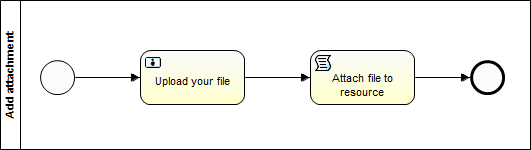
Take the user task script tasks from this [example workflow](https://cdn.collibra.com/developer/AddAttachment.bpmn) and integrate the upload functionality into your own wrokflow. The user task asks for a file to be uploaded. The script task retrieves the required information from that file and uses the `AddAttachmentRequest` builder of the Java Core API to attach it to the current resource.
The user task form has a `fileUpload` field with the ID `file` that is marked as required.
The Groovy script task performs the following operations:
* Sets a fileName and a *fileStream* variable that are required by the add attachment request builder:
```groovy
UUID fileUUID = string2Uuid(file)
FileInfo fileInfo = fileApi.getFileInfo(fileUUID)
String fileName = fileInfo.getName()
InputStream fileStream = fileApi.getFileAsStream(fileUUID)
```
## Example workflow
Take the user task script tasks from this [example workflow](https://cdn.collibra.com/developer/AddAttachment.bpmn) and integrate the upload functionality into your own wrokflow. The user task asks for a file to be uploaded. The script task retrieves the required information from that file and uses the `AddAttachmentRequest` builder of the Java Core API to attach it to the current resource.
The user task form has a `fileUpload` field with the ID `file` that is marked as required.
The Groovy script task performs the following operations:
* Sets a fileName and a *fileStream* variable that are required by the add attachment request builder:
```groovy
UUID fileUUID = string2Uuid(file)
FileInfo fileInfo = fileApi.getFileInfo(fileUUID)
String fileName = fileInfo.getName()
InputStream fileStream = fileApi.getFileAsStream(fileUUID)
```
The first three lines are meant to illustrate the various Java classes that are being used to get the name of the uploaded file. You can use String fileName = fileApi.getFileInfo(string2Uuid(file)).getName() instead.
The item variable refers to the current resource you are attaching the file to: a community, domain or asset. You use it to access the WorkflowBusinessItem bean of the Workflow Java API.